Suppose you are in a website with hundreds of products, but had no convenient tool to help you narrow down your selections.
It may take some time to find the right size, colour or price.
This is where product filters come in handy.
Product browsing can be increasingly simplified and less frustrating for WooCommerce stores with larger or more diverse catalogues, with well-designed filters.
What Are WooCommerce Product Filters?
Product filters enable customers to reduce the number of products shown in a category and/or shop page.
Filters could be price, size, colour, brand, availability or technical specifications, depending on your products.
A person looking for a bike, for instance, could wish to view only electric mountain bikes in a specific price range.
They do not have to go through the entire catalogue, but can choose the proper filters and see the relevant products.
1. Select Filters Based on Your Products
Not all stores require the same filters.
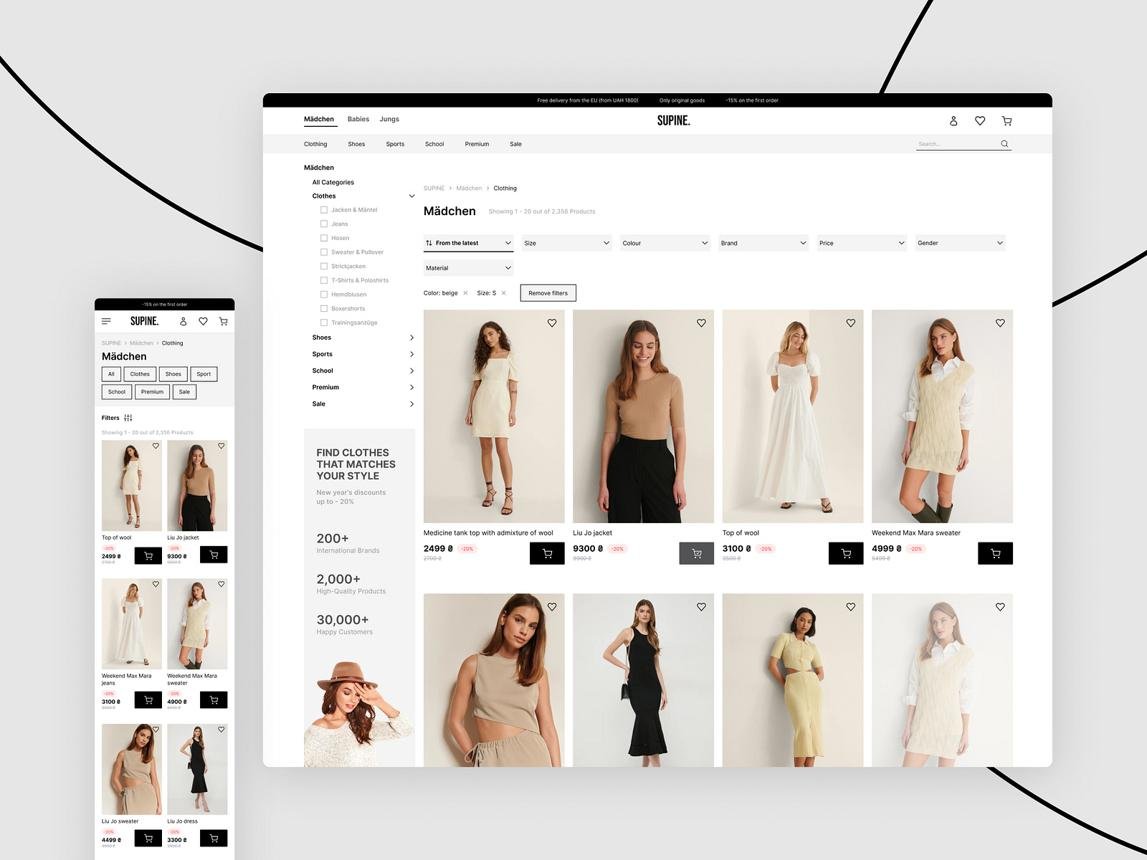
Size, colour, material and price filters can be helpful in a clothing store.
Filters such as brand, storage capacity, connectivity and technical specification might be required for an electronics store.
Begin by taking into account the facts of the product that customers actually use to help make decisions.
An overabundance of filters can complicate the shopping process.
2. Use the Proper Organisation for Product Attributes
Consistent product data is key to be able to implement useful product filters.
The attributes in WooCommerce can be used to define attributes like colour, size, or material.
If there are multiple inconsistent names for the same colour, filtering might not yield the expected results.
For instance, if the ‘Dark Blue’ color is used in some instances and then in other instances a ‘Navy’ or ‘Navy Blue’ is used, this can divide products into categories.
Properly design the attribute structure and create advanced filters.
3. Simplify Filters, So They Are Easy to Use on Mobile Devices
Users’ screens are small on mobile devices.
The large filter sidebar, which functions on desktop, might not be feasible on a smaller device.
You might want to use a button with a well defined label to launch a separate panel.
A selection of options should be given that can be applied and subsequently removed from filters easily.
Ensure that the filtering interface does not cover the important content or is hard to close.
4. Make Sure That Any Active Filters Are Conveyed to the Viewer
It is always good practice for customers to know the reasons behind the display of certain items.
When possible, show the filters location close to the product list.
For instance, when a shopper visits a catalogue, they may discover it’s arranged by medium size and black colour.
Make an easy way to remove a single filter and to clear all filters.
This assists users to alter the search without having to start it once again.
5. Handle Empty Results Carefully
Occasionally, no matching products are found when multiple filters are applied.
It is not very useful to have a blank product grid.
However, show a clear message, indicating that no products are found that correspond to the selected parameters.
Provide a convenient mechanism to drop filters and look for other products.
If applicable, you can suggest nearby alternatives.
6. Consider Website Performance
Can generate extra database queries with advanced filtering.
Large catalogues with WooCommerce can be affected by the performance of poorly set up filtering systems.
Select a filtering method that is appropriate for your store size and complexity.
Use realistic product data instead of a nearly empty demonstration catalogue.
Also look for ways to filter, and if that is still applicable in your caching environment and product variations.
7. Some Pages Are Filtered Pages, Make Sure You Review SEO for Filtered Pages
There can be many combinations of URLs created with product filters.
These URLs can be a challenge for SEO management in large stores.
Determine if there is a need for an indexable landing page for filtered collections or if they should be navigation.
Don’t forget that not all combinations of filters should be automatically generated as indexed pages.
You need to take into account the structure of the catalogue, the need for search and technical implementation.