A café owner is fed up with their accountant and searches for “accountant for small business [city]”. Three websites say they provide accounting, tax and advisory services. The owner calls the firm that mentions cafés and shows what a fixed monthly fee includes. Accountant website not getting enquiries? Put yourself in that owner’s place.
Most accountant websites lose enquiries because they list services without saying who they help, hide fees and make the first step feel like a commitment.
These eight fixes follow what a visitor sees, from the homepage to the reply they receive after getting in touch. The same checks work for bookkeeping and tax practices. If you need help applying them, see our WordPress web design service.
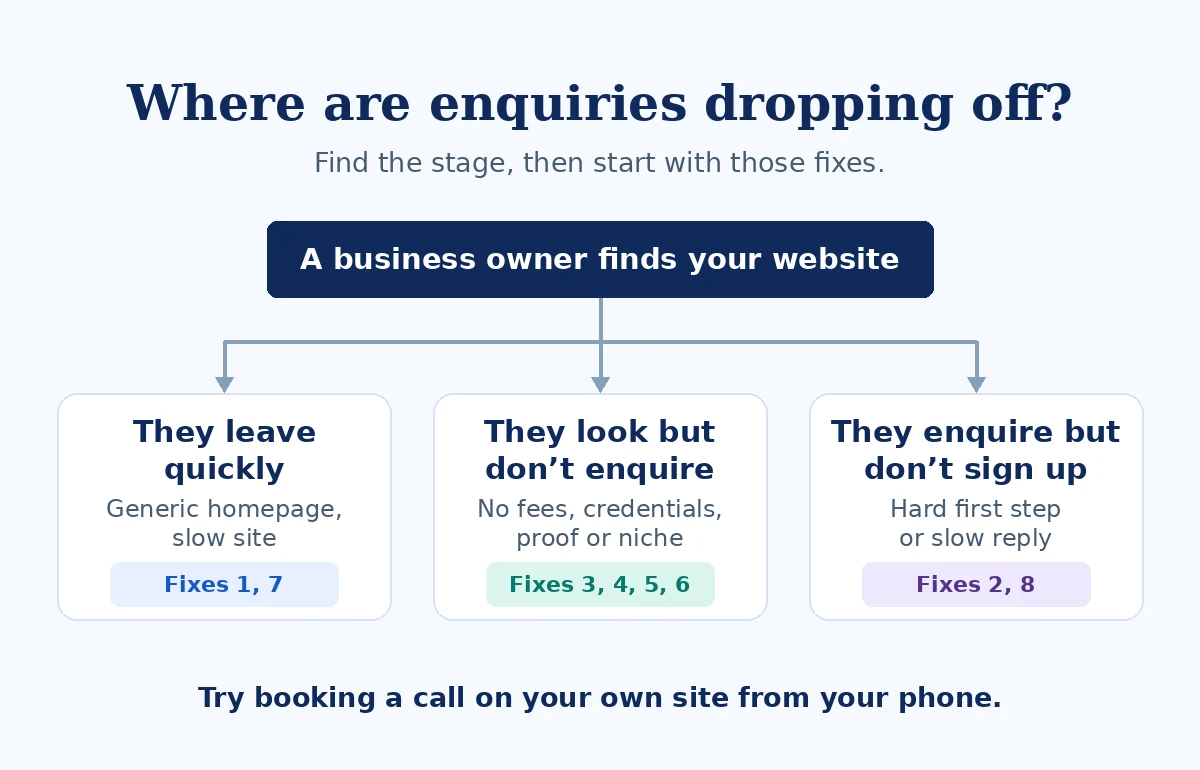
Accountant website not getting enquiries? A quick check for where would-be clients drop off
Start with what you see in enquiries or hear from prospects. Use this table to choose a check, then try the same journey on a phone. A visitor may leave a page for several reasons, so treat each row as a place to investigate.
| What you see | Likely cause | Go to fix |
|---|---|---|
| Visits but quick exits | Generic homepage | 1. Homepage |
| Long visits but no contact | No clear next step | 2. Booking |
| Mostly price shoppers or “how much?” calls | Fees hidden or unclear | 3. Fees |
| Questions about qualifications | Credentials missing | 4. Credentials |
| Wrong-fit enquiries | No niche service pages | 5. Service pages |
| Referrals visit and leave without making contact | Weak proof | 6. Reviews and examples |
| Few local visits | Local visibility or mobile speed | 7. Local search and speed |
| Enquiries go cold | Slow follow-up | 8. Replies |
How I check an accountant’s website
I call an accountant for [business type] [city] on my mobile broadband and then search for an accountant for [business type] [city] with mobile broadband. I also type in the name of the firm, as if a prospect had been just referred to me. I don’t know who the firm serves, what it costs, and how I would begin when I open the site, I give myself 10 seconds to figure it out.
I send a test enquiry or make a test call with the firm’s approval and see what’s returned. Regardless of any starting point, I look for confirmation, a clear next step and the same contact information. The practice below is utilized in the mockups below.
2. Your homepage contains services, not who you serve
The work is titled “Accounting, tax and advisory services” and it is left to the visitor to determine if the firm is knowledgeable about businesses such as his. It’s best to begin with clients you already have that you do a good job for, for example, tradespeople, landlords, contractors, online sellers or start-ups. Whether it’s organizing receipts, ensuring that the payroll is on time or assisting them with tax bill prep, say what you take off their plate.
Common problems
A good and catchy headline for any firm.
A lengthy list of services before the visitor even knows who it’s for.
Small contact link to be difficult to find on mobile.
How to replace what is shown
Who your primary clientele are, and where they are located.
Clear illustration of the responsibilities you perform for that group.
A bookable button and guidance on fees is visible.
A bookkeeper with a website that has traffic but not much relevant queries can do the same. The phrase “bookkeeping for online shops in [city]” provides a launch pad. There’s a line about reconciling orders and payouts that can help them understand why it’s a good service for their business.
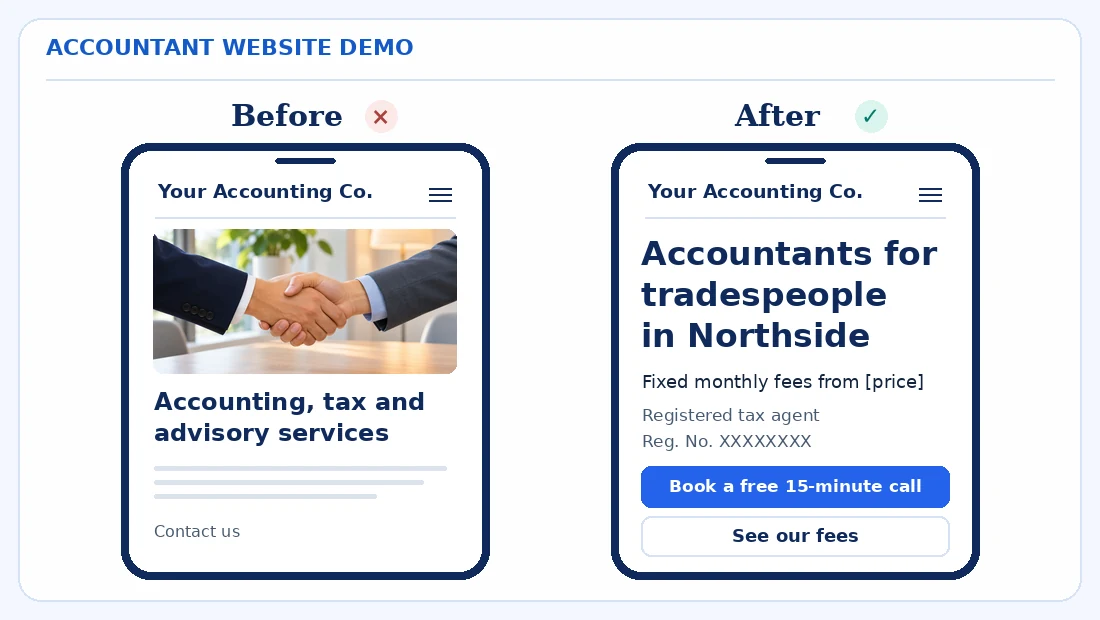
Fix first. Rewrite the homepage headline using “[Who you help] + [what you take off their plate] in [city]”. Read it aloud and check that a client would recognise their business in it.
2. The only next step is ‘Contact us’
“Contact us” leaves visitors guessing whether they’ll need to explain their finances, sit through a sales call or wait for an email. Offer one low-pressure first step, such as a free 15-minute call, a short switch-accountants form or a callback request. Tell them what you’ll cover and what happens after they send the form.
Ask for a name, an email address or phone number, business type and a short note about the help they need. If you offer online appointments, check the times shown and make sure the confirmation reaches both the visitor and your team. See our guides to choosing a WordPress booking system and fixing WordPress form emails.
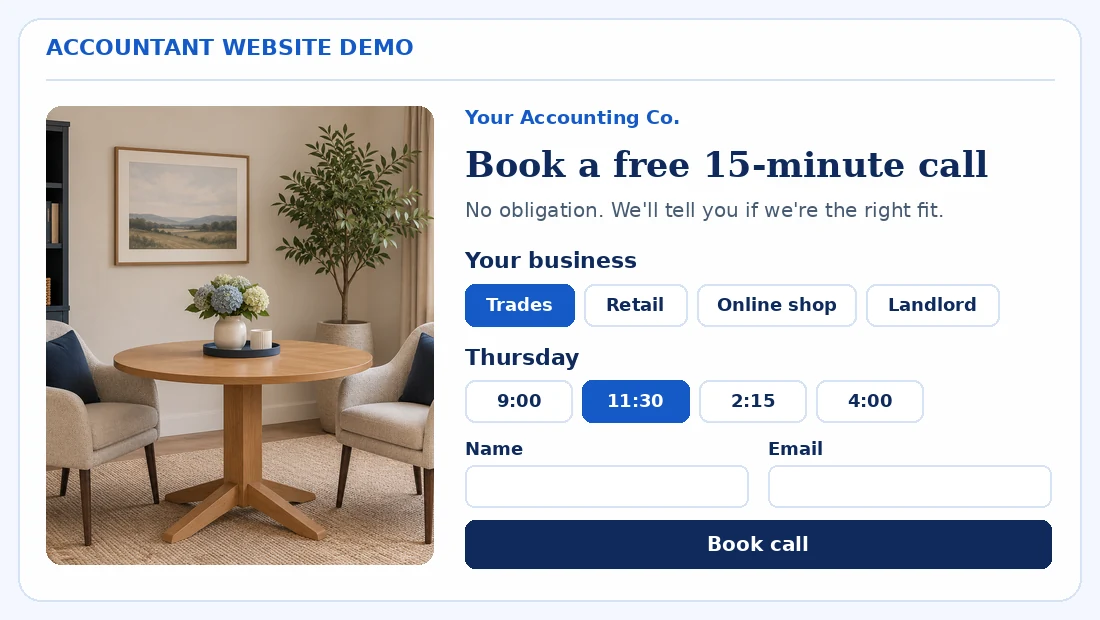
Fix first. Add a “Book a free 15-minute call” button to each service page, then complete the booking once on your phone.
3. Your fees are a mystery
If a business owner is unsure if bookkeeping would result in a consistent monthly charge, they might be hesitant to call. Set a fixed fee for a consistent scope or state a fee that serves a specific scope at the beginning. Define separate cost items like historical clean-up or extra payroll period.
For instance, present monthly bookkeeping from and the starting fee, and explain what is included in the starting fee. If you offer a year end account from example, use a separate one for this with its own fee. Be sure to use your own scopes and amounts as this should allow readers to compare the right services.
If prices are too widely spread for a useful starting point, provide information about the inputs, such as number of transactions, number of payroll staff, whether the data is current or not, etc. Explain the client when they receive a definite price and agree the scope before work begins. Also, the guidance of fees can help prospects figure out if the firm is within their budget before making any enquiries.
Fix first. Write an easy-to-understand Fees page with two or three examples of fees and their contents. Connect to it from the service page(s) that apply.
4. Your credentials are lacking, or have been used incorrectly
Put any relevant qualifications, memberships, etc and current registrations on your About page and near a service to which they apply. Be clear about which are for the firm and which are for an individual team member. Only use your credentials and verify the rules at your practice location.
Australia. Generally, to be registered to provide tax agent services for a fee or other benefit, the provider needs to be registered with the Tax Practitioners Board (TPB) unless an exemption applies. The TPB also states that it can impose serious penalties for people who offer or promote tax agent services, or pretend to provide them, when they are not registered as a tax agent. If you are using the registered practitioner symbol, put the type of registration and number that corresponds to that symbol. The number is on the TPB Register for visitors to check. The Tax Practitioners Board (TPB) provides guidance on who should register and the registered tax practitioner symbol.What is the Tax Practitioners Board (TPB)? Who needs to be registered? About the registered tax practitioner symbol.
UK. ICAEW rules determine if a firm can use the designation “Chartered Accountants”. Review eligibility and dispensation requirements and differentiate between the chartered staff and other team members, if relevant. ICAEW: Use of the description ‘Chartered Accountants’.
US. Please consult your state board of accountancy prior to using CPA for website advertising. Request guidelines for the office and for individual employees.
These notes are notes on publishing on the web. Check with your regulator or professional body what their requirements are for your practice.
Fix first. Include your current registration number (if applicable) and professional body information in the footer and About page.
5. One ‘Services’ page does it all
Devote a page to core services including bookkeeping, tax returns, payroll, VAT / BAS and management accounts. On an industry page like “Accountant for tradespeople in [city]”, write the questions that your ideal clients ask. Explain the scope of work, fee considerations & call scheduling.
If you serve multiple cities, create pages based on actual differences like an office that you can refer your clients to, the cities you serve, how meetings work, etc. Learn how to plan service area pages using our guide to creating useful service area pages.
Fix first. Create one page for your best fit niche with real-life examples of the work you do, but don’t expose your clients.
6. There is no evidence available as client work is confidential.
Before contacting you, referrals will check you out. Provide them with something they can refer to like an actual team photo, a short bio with the person’s qualifications, or a list of the software your practice uses. If you’re okay with sharing the real work with a case example, you can do that and let anyone know how your team did it, e.g. how you moved a plumbing business to monthly bookkeeping.
Request permission to post a case example or review in writing. Eliminate identifying elements like a specific location and an uncommon business size. If there is a possibility that the client can recognize himself, display the final text to the client. Be authentic and ask for permission to post a review – don’t go around offering freebies for reviews.
Fix first. Request three known clients that have been around for a long time to write a brief testimonial and permission to post it on the relevant service page.
7. Local searchers can’t find you, or the site is slow
If somebody looks for an accountant near me or reads a recommendation, it will be easy to verify that they’ve stumbled across the proper practice. Make sure your Google Business Profile is accurate and comprehensive, matching your website. Describe your service areas and state if they can come to you or you will work with them remotely.
To open the main service page on mobile data, tap or click it.Tap or click on the main service page to open it on mobile data. Google’s good Core Web Vitals thresholds are Largest Contentful Paint (LCP) of 2.5 seconds or less, Interaction to Next Paint (INP) of 200 milliseconds or less and Cumulative Layout Shift (CLS) of 0.1 or less. These are the terms that refer to loading, responsiveness and visual stability. You can test mobile and desktop using PageSpeed Insights. The new Google Search Central, Core Web Vitals, will be a welcome addition to Google’s search engine optimization toolbox.
If the headline takes too long to load, or the booking button moves around, use our Elementor Core Web Vitals guide to find out why. Test booking page / form and home page.
Fix first. Review and confirm your company name, address, phone number and hours on your website and Google Business Profile.
8. Slow or awkward replies to enquiries
A person moving accountants might reach out to multiple companies as they’re looking for a new firm. Automatically reply with the booking link and a reply time frame that is conducive for your team. If you’re expecting enquiries during the tax season, add a brief capacity note near the form when it’s time for the start of a later season.
Avoid sharing tax file numbers, NI numbers, Social Security numbers, or financial documents in public website forms or plain letters/emails. Invite clients to a secure portal after onboarding when it’s time to exchange documents. Record completed forms and bookings, but not what clients type. Read our WordPress Form Submission Guide for GA4.
Fix first. Make an auto-reply that contains a booking link and lets people know when you will be back in touch. Make a test phone inquiry, receiving a response will indicate that it is functional.
What to fix first
Effort and impact are our estimates for a small practice. If you already have enquiries waiting for a reply, start there while you improve the pages that send them to you.
| Fix | Effort | Who usually does it | Impact on enquiries |
|---|---|---|---|
| 1. Rewrite the homepage | Low | Practice owner | High |
| 2. Add a booking option | Medium | Practice manager or developer | High |
| 8. Improve follow-up | Low | Practice manager | High |
| 3. Explain fees | Low | Practice owner | High |
| 4. Show credentials | Low | Practice owner | Medium |
| 5. Add service and niche pages | High | Practice owner and writer | High |
| 6. Add reviews and examples | Medium | Practice manager | Medium |
| 7. Check local search and speed | Medium | Practice manager or developer | Medium |
Frequently asked questions
Why is my accounting firm website getting visits but no enquiries?
Visitors may be unable to tell whether you help firms like theirs or how to start a conversation. Open a service page on your phone and see whether you can find the audience, fee guidance and a booking option. If those are clear, send a test enquiry to check that the form and confirmation work.
Should accountants show their fees on their website?
Show a fixed fee or starting price when you can explain the scope in plain terms. List what’s included and flag common extras so prospects know what the figure covers. If you quote each engagement individually, name the factors that affect the quote and tell people when they’ll receive it.
Should an accountant’s website focus on a niche?
A niche helps when you know a group’s recurring problems well enough to explain how you help. You can lead with your best-fit audience on the homepage and keep other core services available on their own pages. Use concrete examples of work for that group, such as tracking subcontractor costs for tradespeople.
Can I use client testimonials if my work is confidential?
Use testimonials only with written consent and anonymise details that could identify a client or expose private information. Agree with the client on the wording and where it will appear. If they prefer to keep the relationship private, use team bios or a clear explanation of your process to help visitors assess your practice.
Do I need to show my registration number on my website?
Registration display rules differ by country and profession. In Australia, practitioners who use the TPB’s registered tax practitioner symbol must display the appropriate registration type and registration number with it. Check with your professional body or regulator for the wording and placement that apply to your practice. Tax Practitioners Board: About the registered tax practitioner symbol
What should an accountant’s enquiry form ask?
Ask for a name, an email address or phone number, business type and a short description of the help they need. Show when they can expect a reply. Keep identity numbers and financial documents out of public forms and plain email, and use your secure client portal once onboarding is complete.
How quickly should I reply to a new client enquiry?
Send an immediate confirmation, then follow up within a window your team can reliably meet. The confirmation can share a booking link and tell people what to expect from the first call. If tax season changes your availability, update the page and the reply so prospective clients know when you can take on work.
Final word
A business owner can decide whether to enquire when they know you help firms like theirs, roughly what the work costs and which qualifications back it up. Give them a first step they can take on their phone and tell them when they’ll hear back.
Start with the homepage headline, a booking link and a clear fees page. For related reading, see our guide to finding where visitors get stuck before booking a discovery call.