
Choosing an SEO plugin is one of the first real decisions you’ll make when setting up a WordPress site. We’ve installed, configured, and troubleshot most of the major players on client sites for years, including plenty of Elementor builds, so this comparison comes from actual usage, not just reading changelogs.
This guide compares the six SEO plugins WordPress users search for most: Rank Math, Yoast SEO, All in One SEO, SEOPress, Slim SEO, and The SEO Framework. By the end, you’ll know which one fits your website, your skill level, and your budget.
Why You Need an SEO Plugin
WordPress doesn’t handle SEO out of the box. There’s no built-in way to set meta titles, generate an XML sitemap, add schema markup, or manage redirects.
An SEO plugin fills that gap. It gives you a simple interface to control how Google sees and displays your pages.
Here’s what a good SEO plugin typically handles:
- Meta titles and descriptions
- XML sitemaps
- Schema markup (structured data)
- Canonical URLs
- Open Graph tags for social sharing
- Redirect management
- Content readability and keyword checks
You technically can run a site without one. We wouldn’t recommend it, especially if you’re relying on organic traffic to generate leads or sales.
What Makes a Good WordPress SEO Plugin in 2026
The best WordPress SEO plugins in 2026 share a few traits that weren’t as important five years ago.
Speed matters more than ever. Google’s Core Web Vitals are a ranking factor, and a bloated SEO plugin can undo the benefit of good content.
Schema support needs to go beyond the basics. Product, FAQ, Review, LocalBusiness, and Article schema are now standard expectations, not premium extras.
AI features are becoming genuinely useful. Rank Math and AIOSEO now offer AI-assisted title and description writing, which saves real time on large sites.
WooCommerce compatibility can’t be an afterthought. If you’re running a store, your SEO plugin needs to handle product schema and category pages properly.
If your website is slow after installing multiple plugins, a professional Speed Optimization service can significantly improve Core Web Vitals without you needing to remove features you actually use.
Detailed Plugin Reviews
1. Rank Math
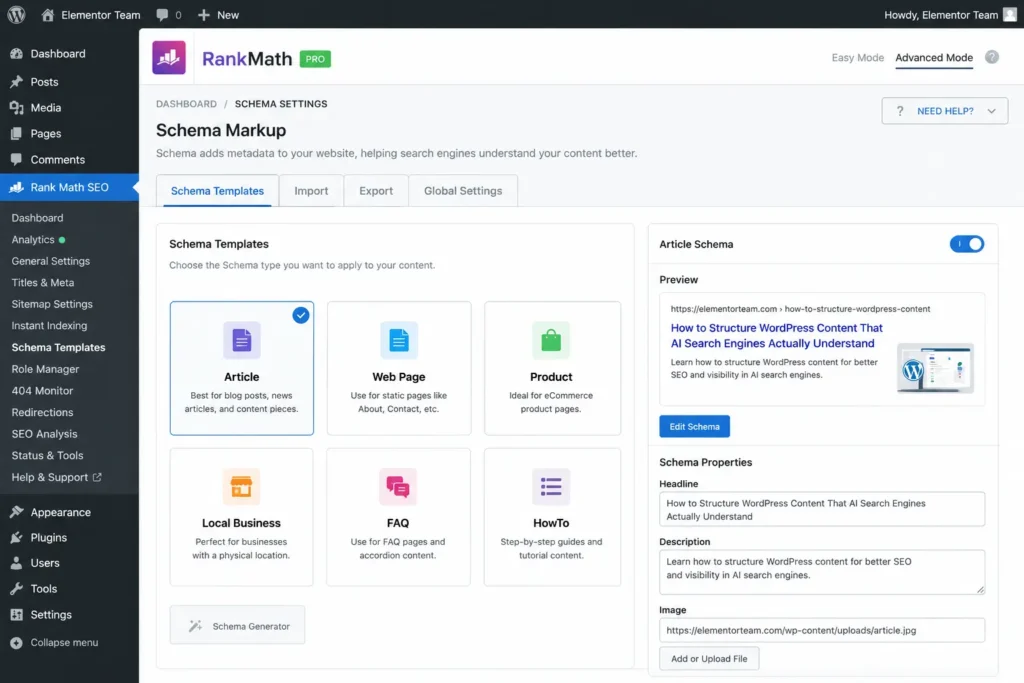
Overview: Rank Math launched in 2018 and quickly became the plugin we reach for most often on Elementor sites. It packs an unusually generous free version with features other plugins reserve for paid tiers.
Pros:
- Free version includes unlimited focus keywords and full schema support
- Built-in redirect manager and 404 monitor, even on the free plan
- AI-assisted content and metadata suggestions
- Strong WooCommerce SEO module
Cons:
- Setup wizard has a lot of options, which can overwhelm first-time users
- Some users report occasional conflicts with caching plugins
Best for: Agencies, WooCommerce stores, and Elementor websites that need advanced schema without paying immediately.
Pricing: Free version is fully functional. Pro starts around $59/year for a single site.
AI Features: Rank Math’s AI tools can generate titles, meta descriptions, and even full content outlines based on your focus keyword.
Schema Support: This is where Rank Math leads the pack. It supports 20+ schema types in the free version alone, including FAQ, HowTo, and Product.
WooCommerce Support: Native WooCommerce SEO module with product schema, rich snippets, and variable product handling.
Performance Impact: Lightweight compared to Yoast, with minimal effect on page load times in our testing.
Ease of Use: Moderate learning curve because of the number of modules, but the setup wizard walks you through the essentials.
Elementor Compatibility: Works cleanly with Elementor and Elementor Pro, including the Theme Builder and dynamic content fields.
Our experience: We’ve used Rank Math on large Elementor websites with hundreds of pages, and the built-in redirect manager alone has saved us from needing a separate plugin.
2. Yoast SEO
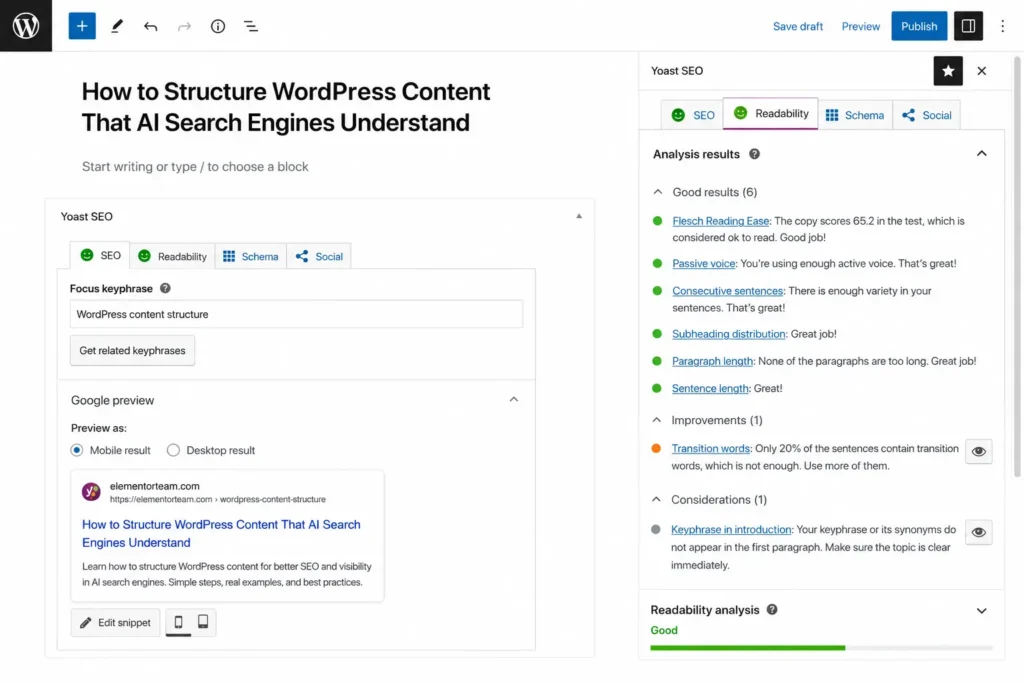
Overview: Yoast SEO is the plugin most WordPress users encounter first. It’s been around since 2010, and its readability and keyword analysis tools set the standard the rest of the industry followed.
Pros:
- Extremely beginner-friendly interface
- Excellent documentation and tutorials
- Reliable readability analysis for content writers
- Huge install base means broad theme and plugin compatibility
Cons:
- Free version limits you to one focus keyword per page
- Redirect manager and advanced schema require the premium version
- Slightly heavier on page load than newer competitors
Best for: Bloggers, small business websites, and beginners who want a simple, guided setup.
Pricing: Free version available. Premium is about $99/year for one site.
AI Features: Yoast has introduced limited AI title and meta description generation in premium, though it’s less developed than Rank Math’s toolset.
Schema Support: Solid basic schema (Article, Organization, Breadcrumb) built in, but advanced types need the premium plugin or add-ons.
WooCommerce Support: Yoast WooCommerce SEO is a separate paid add-on, which adds to the total cost.
Performance Impact: Noticeably heavier than Rank Math or Slim SEO, though still acceptable on most hosting.
Ease of Use: The easiest plugin on this list for someone who has never touched SEO settings before.
Elementor Compatibility: Works well with Elementor, with clean integration for meta boxes and content analysis.
Our experience: For small business websites, Yoast is usually easier for the client to manage themselves after we hand the site over.
3. All in One SEO (AIOSEO)
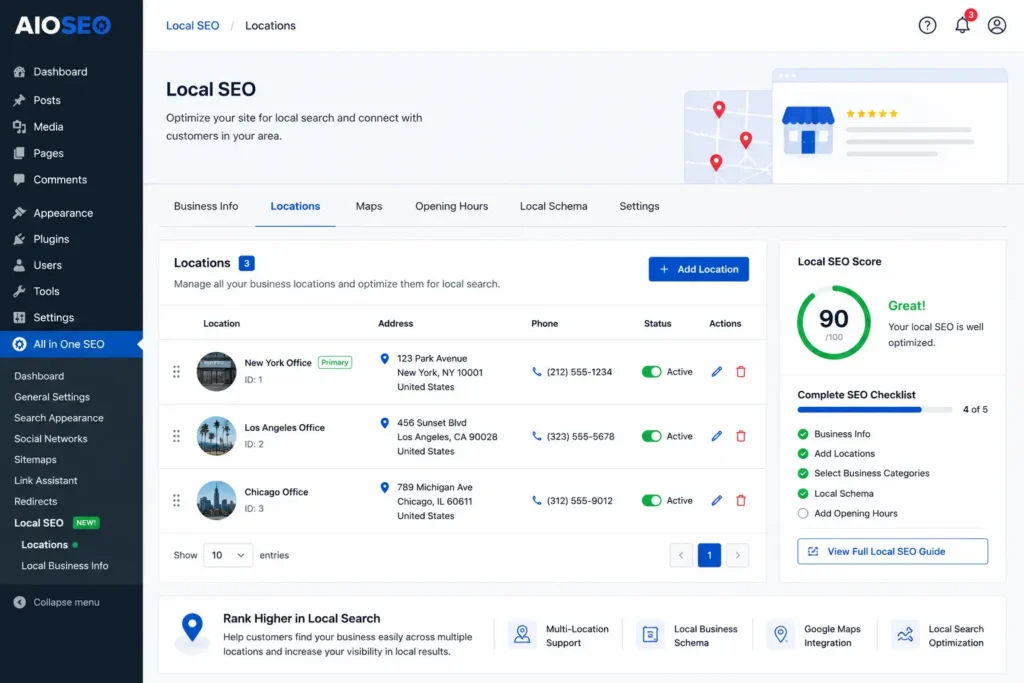
Overview: AIOSEO has repositioned itself as an all-in-one toolkit, bundling local SEO, WooCommerce SEO, and link management into one plugin family.
Pros:
- Local SEO module is genuinely strong for multi-location businesses
- Smart Schema feature auto-detects appropriate schema types
- Link Assistant helps with internal linking, which most competitors don’t offer
- Clean, modern dashboard
Cons:
- Free version is more limited than Rank Math’s
- Some advanced features are locked behind higher-tier plans, not just any premium plan
Best for: Local businesses, multi-location websites, and agencies managing several client sites.
Pricing: Free version available with basics. Pro plans start around $49.50/year but scale up quickly for advanced features.
AI Features: AIOSEO includes AI title/description generation and an AI-powered content analysis tool.
Schema Support: Smart Schema is one of the more automated schema tools available, reducing manual configuration.
WooCommerce Support: Built-in WooCommerce SEO with product schema and dynamic variable support.
Performance Impact: Reasonably lightweight, comparable to Rank Math in most benchmarks.
Ease of Use: Beginner-friendly with a setup wizard, though the number of add-ons can feel like upselling.
Elementor Compatibility: Integrates well with Elementor, including support for dynamic templates.
Our experience: For WooCommerce stores, Rank Math offers more features in the free version, but AIOSEO’s Local SEO module is genuinely better if you’re managing multiple physical locations.
4. SEOPress
Overview: SEOPress is the plugin developers tend to recommend, mostly because it avoids upsell prompts and gives you granular control without the marketing noise.
Pros:
- No aggressive upselling inside the dashboard
- White-label option for agencies
- Google Analytics and Search Console integration built in
- One-time pricing option available, unlike most competitors
Cons:
- Interface feels more technical, less guided for absolute beginners
- Smaller community and fewer tutorials than Yoast or Rank Math
Best for: Agencies and developers who want full control and white-label branding for client reports.
Pricing: Free version available. Pro is around $59/year, or a lifetime license is offered periodically.
AI Features: SEOPress includes AI content assistance through an integration rather than a fully native tool.
Schema Support: Strong schema support, including custom schema types you can build manually.
WooCommerce Support: Solid WooCommerce SEO module with product schema included in the free version.
Performance Impact: One of the lighter plugins on this list.
Ease of Use: Steeper for beginners, comfortable for anyone with prior SEO plugin experience.
Elementor Compatibility: Compatible with Elementor, with no notable conflicts in our testing.
5. Slim SEO
Overview: Slim SEO takes a minimalist approach. It automates as much as possible and gives you almost no settings screen, which is either exactly what you want or exactly what frustrates you.
Pros:
- Extremely lightweight, near-zero performance impact
- Auto-generates meta tags and schema without manual input
- No account creation or license key required
- Completely free with no upsells
Cons:
- Very limited manual control for advanced SEO strategies
- No AI features
- Not ideal for complex WooCommerce stores needing granular schema control
Best for: Portfolio sites, small blogs, and developers who want automation over configuration.
Pricing: Free, with an optional premium add-on bundle for extra modules.
AI Features: None currently.
Schema Support: Automatic and functional, but not as customizable as Rank Math or SEOPress.
WooCommerce Support: Basic support exists, but larger stores will likely outgrow it.
Performance Impact: The lightest plugin in this comparison, by a clear margin.
Ease of Use: The easiest plugin to “set and forget,” since there’s barely a settings screen.
Elementor Compatibility: Works fine with Elementor for straightforward sites without complex schema needs.
6. The SEO Framework
Overview: The SEO Framework sits between Slim SEO’s minimalism and Yoast’s full feature set. It’s privacy-focused and doesn’t phone home to third-party servers.
Pros:
- Clean, distraction-free interface
- Genuinely fast, with minimal database queries
- No tracking or external API calls by default
- Free version is capable enough for most small sites
Cons:
- Smaller plugin ecosystem and fewer extensions
- AI features are not part of the core plugin
Best for: Privacy-conscious site owners and anyone who wants solid SEO basics without a cluttered dashboard.
Pricing: Free core plugin, with paid extensions available individually.
AI Features: None built in.
Schema Support: Good default schema output, generated automatically based on page content.
WooCommerce Support: Available through an extension, functional but not as deep as Rank Math’s.
Performance Impact: Very light, similar to Slim SEO.
Ease of Use: Straightforward once you understand its extension-based structure.
Elementor Compatibility: Compatible, no significant issues reported in our testing.
Feature Comparison
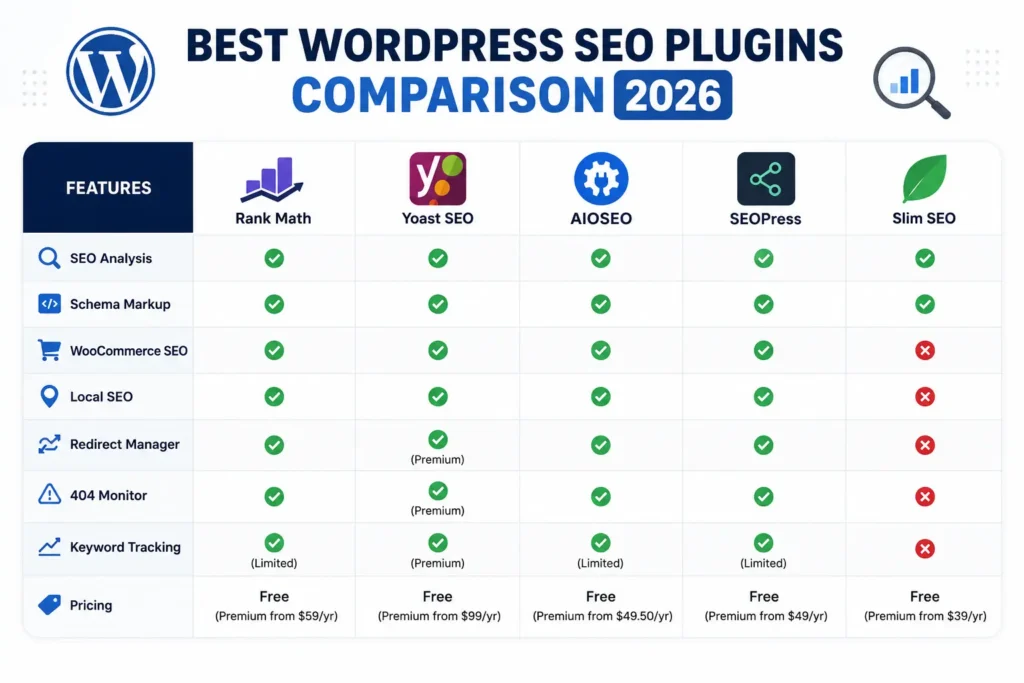
| Plugin | Free Version | Schema | AI Features | WooCommerce | Redirect Manager | 404 Monitor | Local SEO | Performance | Price (Pro) |
|---|---|---|---|---|---|---|---|---|---|
| Rank Math | Yes, generous | Excellent | Yes | Yes | Yes (free) | Yes (free) | Add-on | Light | ~$59/yr |
| Yoast SEO | Yes, limited | Basic | Limited | Add-on (paid) | Premium only | Premium only | Add-on | Moderate | ~$99/yr |
| AIOSEO | Yes, basic | Very good | Yes | Yes | Higher tiers | Higher tiers | Excellent | Light | ~$49.50/yr+ |
| SEOPress | Yes, solid | Very good | Via integration | Yes | Yes | Yes | Add-on | Very light | ~$59/yr |
| Slim SEO | Yes, full | Good (automatic) | No | Basic | Add-on | Add-on | Add-on | Lightest | Free/low-cost |
| The SEO Framework | Yes, solid | Good (automatic) | No | Extension | Extension | Extension | Limited | Very light | Varies |
Pros & Cons Table
| Plugin | Main Pro | Main Con |
|---|---|---|
| Rank Math | Generous free feature set | Setup can overwhelm beginners |
| Yoast SEO | Beginner-friendly | Free version limits keyword targeting |
| AIOSEO | Strong Local SEO tools | Advanced features cost more |
| SEOPress | No upselling, white-label ready | Less guided for beginners |
| Slim SEO | Lightest possible footprint | Minimal manual control |
| The SEO Framework | Privacy-focused, fast | Smaller ecosystem |
Pricing Comparison
| Plugin | Free Plan | Entry Paid Plan | Notes |
|---|---|---|---|
| Rank Math | Yes | ~$59/year | Best value for features included free |
| Yoast SEO | Yes | ~$99/year | WooCommerce add-on costs extra |
| AIOSEO | Yes | ~$49.50/year | Price rises fast for advanced tiers |
| SEOPress | Yes | ~$59/year | Occasional lifetime license offers |
| Slim SEO | Yes | Low-cost add-ons | Core plugin stays free |
| The SEO Framework | Yes | Extension-based | Pay only for what you need |
Performance Comparison
Based on our testing across similar hosting environments, lighter plugins generally load fewer scripts and run fewer database queries on the admin side, which rarely affects front-end speed directly but does affect the WordPress dashboard experience.
- Lightest: Slim SEO and The SEO Framework
- Light: Rank Math and SEOPress
- Moderate: AIOSEO
- Heaviest: Yoast SEO
Front-end performance differences between these plugins are usually small. Your theme, hosting, images, and Elementor page complexity matter far more than which SEO plugin you choose.
AI Features Comparison
AI-assisted SEO tools save time on large sites, but they’re not a replacement for understanding your audience.
- Rank Math: AI titles, descriptions, and content suggestions built into the core plugin
- AIOSEO: AI title/description generation plus AI content analysis
- Yoast SEO: Basic AI features in premium, still developing
- SEOPress: AI available through third-party integration
- Slim SEO: No AI features
- The SEO Framework: No AI features
Schema Support Comparison
Schema markup helps Google understand your content and can trigger rich results like star ratings, FAQ dropdowns, and product pricing in search.
| Plugin | Schema Depth |
|---|---|
| Rank Math | 20+ schema types, free |
| AIOSEO | Smart Schema, automated detection |
| SEOPress | Strong, includes custom schema builder |
| Yoast SEO | Basic free, deeper with premium |
| Slim SEO | Automatic, limited customization |
| The SEO Framework | Automatic, limited customization |
WooCommerce SEO Comparison
If you’re running a store, schema accuracy on product pages directly affects click-through rates from search results.
- Rank Math: Strongest free WooCommerce module
- AIOSEO: Strong built-in WooCommerce SEO
- SEOPress: Solid, included in free version
- Yoast SEO: Requires a separate paid add-on
- Slim SEO: Basic, fine for small catalogs
- The SEO Framework: Available via extension
If you’re migrating from Yoast to Rank Math for better WooCommerce features, a professional Website Migration service ensures metadata, redirects, and schema remain intact during the switch.
Local SEO Comparison
For businesses with a physical location or multiple locations, local SEO tools matter more than generic schema.
- AIOSEO: Best dedicated Local SEO module, ideal for multi-location businesses
- Rank Math: Local SEO add-on covers most single-location needs
- Yoast SEO: Local SEO add-on, solid but paid separately
- SEOPress: Local business schema supported, less dedicated tooling
- Slim SEO / The SEO Framework: Basic local schema only
Ease of Use
If you want a plugin you barely have to think about, Slim SEO or The SEO Framework fit best.
If you want guided setup with explanations along the way, Yoast SEO remains the most approachable.
If you’re comfortable with more settings in exchange for more control, Rank Math, SEOPress, and AIOSEO all work well.
Which Plugin Is Best for Beginners?
Yoast SEO is usually the easiest starting point for someone new to WordPress. The readability checker and step-by-step prompts make it hard to get lost.
Rank Math is a close second. Its setup wizard is more detailed but gives you far more for free once you’re through it.
Which Plugin Is Best for Agencies?
SEOPress is a strong pick for agencies because of white-label branding, which lets you present the plugin under your own company name in client dashboards.
Rank Math also works well for agencies managing multiple sites, especially when advanced schema and redirects need to be free by default.
Which Plugin Is Best for WooCommerce?
Rank Math is our default recommendation for WooCommerce stores, mainly because product schema and rich snippets come free.
AIOSEO is worth considering if local inventory or multi-location selling is part of your strategy. If your WooCommerce SEO Plugin setup still isn’t translating into sales, a dedicated WooCommerce Development review can catch structural issues a plugin alone can’t fix.
Which Plugin Is Best for Elementor?
All six plugins on this list work with Elementor without conflicts, based on our testing. Rank Math tends to be our go-to for Elementor SEO on larger builds because of its schema depth and redirect manager.
For simpler Elementor sites, Slim SEO or The SEO Framework keep things fast without extra configuration. If you’re planning a new build, our Elementor Development team can set up the right plugin and schema structure from day one.
Common Mistakes When Using SEO Plugins
- Running two SEO plugins at once. This causes duplicate meta tags, conflicting sitemaps, and confused schema output.
- Leaving default meta titles and descriptions unedited. The plugin gives you the tools; it doesn’t write good copy for you automatically unless you use the AI features.
- Ignoring the XML sitemap submission step. Installing the plugin doesn’t automatically submit your sitemap to Google Search Console.
- Over-optimizing content for a single keyword. Modern SEO plugins score readability and keyword density, but stuffing keywords still hurts rankings.
- Forgetting to update redirects after a redesign. A Website Redesign without proper redirect mapping can quietly wipe out years of rankings.
If your SEO plugin is configured correctly but rankings still aren’t improving, a professional SEO Optimization service can identify technical issues beyond plugin settings, such as site architecture or backlink gaps.
Our Recommendation
There’s no single best WordPress SEO plugin for every situation, and we’d be skeptical of anyone who tells you otherwise.
- Choose Rank Math if you want the most features for free, especially for WooCommerce or agency work.
- Choose Yoast SEO if you’re a beginner who values simplicity and guided setup over advanced free features.
- Choose AIOSEO if local SEO and multi-location management are priorities.
- Choose SEOPress if you’re an agency that wants white-label branding and no upsell prompts.
- Choose Slim SEO if you want the lightest possible plugin and don’t need advanced manual control.
- Choose The SEO Framework if privacy and speed matter more to you than a large feature list.
Final Verdict
For most WordPress and Elementor websites we build, Rank Math offers the best balance of free features, schema depth, and WooCommerce support. That said, Yoast SEO remains a reasonable choice for clients who want the absolute simplest experience, and Slim SEO is genuinely great for lightweight portfolio or blog sites.
The right plugin depends on your website type, technical comfort, and growth plans, not on which one has the most reviews.
Best Plugin by Website Type
| Website Type | Recommended Plugin |
|---|---|
| Business Website | Rank Math or Yoast SEO |
| Agency | SEOPress or Rank Math |
| Portfolio | Slim SEO or The SEO Framework |
| WooCommerce | Rank Math or AIOSEO |
| Blog | Yoast SEO or Rank Math |
| News | Rank Math (fast schema updates) |
| Membership | AIOSEO or SEOPress |
| Course Website | Rank Math or Yoast SEO |
| Local Business | AIOSEO |
Beginner vs Advanced Users
| User Level | Best Fit |
|---|---|
| Beginner | Yoast SEO, Slim SEO |
| Intermediate | Rank Math, AIOSEO |
| Advanced / Developer | SEOPress, The SEO Framework |
FAQ
Which is better, Rank Math or Yoast?
Rank Math generally offers more features in its free version, including advanced schema, redirects, and a 404 monitor, which Yoast reserves for premium. Yoast, however, has a more beginner-friendly interface and stronger content readability guidance. If you want maximum free functionality, Rank Math wins. If you want the simplest learning curve, Yoast is usually easier for first-time users to manage independently.
Is Rank Math really free?
Yes, Rank Math’s free version is fully functional and includes unlimited focus keywords, schema markup, a redirect manager, and a 404 monitor. Most competitors lock these features behind a premium plan. The paid version adds features like Google Trends integration, more AI credits, and advanced analytics, but the free version alone covers what most small to mid-sized websites need.
Which SEO plugin is fastest?
Slim SEO and The SEO Framework are the lightest options in this comparison, with minimal impact on both the dashboard and front-end load times. Rank Math and SEOPress are also reasonably light. Yoast SEO tends to be the heaviest of the group, though the difference is usually only noticeable on lower-end hosting or resource-limited servers.
Can I use two SEO plugins together?
No, running two SEO plugins at the same time causes conflicts. You’ll likely end up with duplicate meta tags, conflicting XML sitemaps, and inconsistent schema output, which can confuse search engines. Always deactivate and fully remove one plugin before installing another, and double-check your site’s source code afterward to confirm only one plugin’s tags are present.
Which plugin is best for Elementor?
All six plugins reviewed here work with Elementor without major conflicts. Rank Math is our most-used option for larger Elementor builds because of its schema depth and free redirect manager. For simpler sites, Slim SEO or The SEO Framework keep page load times lower while still covering essential SEO tags automatically.
Which SEO plugin has the best schema support?
Rank Math offers the deepest schema support in its free version, covering more than 20 schema types including FAQ, HowTo, and Product. AIOSEO’s Smart Schema feature automates schema detection well, and SEOPress allows custom schema building for advanced use cases. Yoast SEO’s free schema support is more basic by comparison.
Do SEO plugins improve rankings?
SEO plugins don’t directly improve rankings on their own; they give you the tools to implement good SEO practices correctly, like proper meta tags, schema, and sitemaps. Rankings depend on content quality, backlinks, site speed, and technical health as much as plugin settings. Think of the plugin as the toolkit, not the strategy itself.
Is Slim SEO good?
Slim SEO is a solid choice for smaller websites, portfolios, and blogs that don’t need extensive manual control. It automates meta tags and schema generation with almost no configuration required, and it’s one of the lightest plugins available. It’s not ideal for larger WooCommerce stores or sites needing granular schema customization.
Which plugin is best for WooCommerce?
Rank Math is generally the strongest free option for WooCommerce stores, offering built-in product schema and rich snippet support without needing a paid add-on. AIOSEO is a strong alternative, particularly for stores with local or multi-location inventory. Yoast SEO’s WooCommerce support requires a separate paid extension, which adds to the overall cost.
How do I switch SEO plugins safely?
Start by exporting your current settings and noting your existing redirects, meta titles, and schema configuration before deactivating the old plugin. Install the new plugin and use its import tool if available, since Rank Math, AIOSEO, and others offer one-click imports from Yoast. Afterward, check Google Search Console for crawl errors and verify your XML sitemap has updated correctly.
Conclusion
Every plugin on this list can handle core WordPress SEO, but the right one depends on your website type, technical comfort level, and whether you’re running a blog, a business site, or a WooCommerce store. Rank Math tends to be our default recommendation for feature depth, Yoast SEO remains the easiest starting point for beginners, and Slim SEO or The SEO Framework work well when you want something lightweight and automatic.
Choose based on what your website actually needs, not which plugin has the most downloads. If you’d like help setting up your SEO plugin correctly, improving Core Web Vitals, or optimizing your WordPress or Elementor website for search, our team at Elementor Team is happy to take a look.
Yes! Finally something about chaplets.