A customer asks an AI search tool which local contractor builds decks on sloping yards. The answer links to three businesses and yours is missing, even though you do that work every week. Before rewriting the site, check whether your service page can be found and whether it answers that specific question.
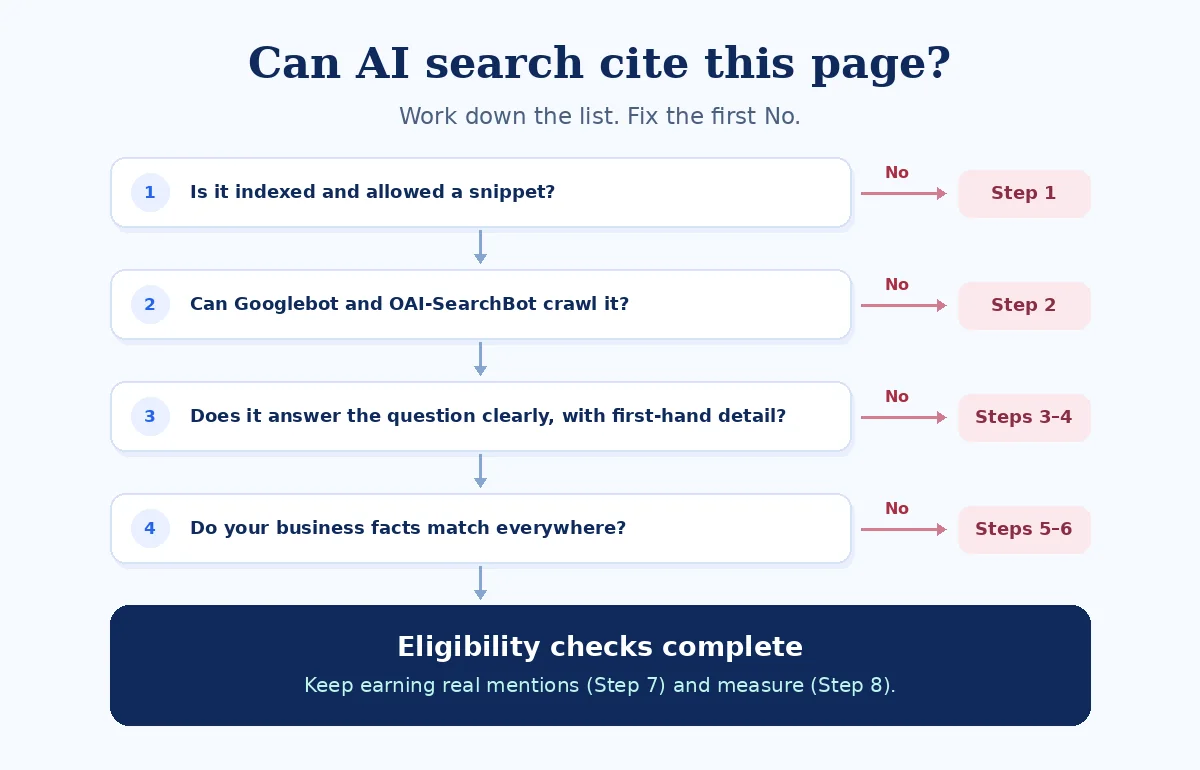
To get cited in AI Overviews or ChatGPT search, make your pages accessible, keep Google pages eligible to show a snippet, and publish clear answers with first-hand detail. Google and OpenAI document how to make content available for their search features. Neither promises a citation. The eight steps below show where to start and which shortcuts to skip. Google Search Central: AI features and your website · OpenAI: Overview of OpenAI crawlers

How AI answers pick the pages they cite
Google’s AI Overviews and AI Mode build on its core Search ranking and quality systems. A page is eligible to appear as a supporting link if Google has indexed it and can show it in Search with a snippet, the preview text that accompanies a result. Google lists no additional page-level technical requirements. Check that your Search Console property allows inclusion in Google’s generative AI features. Google Search Central: Optimizing for generative AI · Google Search Central: AI features and your website · Search Console Help: Search generative AI control
For ChatGPT search visibility, check that your public content is accessible to OAI-SearchBot, the crawler OpenAI uses for search. OpenAI says pages that opt out may still appear as navigational links, while their content is excluded from search answers. An accessible page can be considered alongside other sources. OpenAI: Overview of OpenAI crawlers
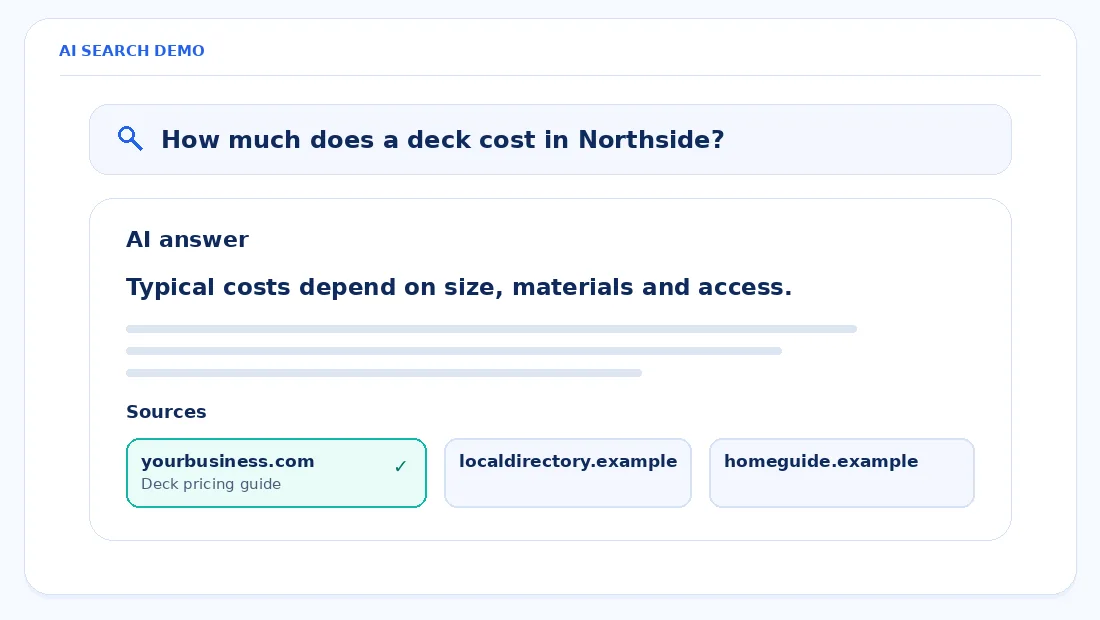
1. Check whether your pages can get cited in AI Overviews
Start with the pages customers need most, such as services, locations, or product guides. In Google Search Console, use URL Inspection on the live URL you want customers to find. When I check a site after a redesign, I start with pages that moved and pages copied from a staging site.
In Rank Math, review the page’s robots meta settings. noindex prevents indexing, nosnippet prevents a snippet, max-snippet limits preview length, and data-nosnippet can exclude specific text. These controls can affect Google’s AI features. Keep restrictions where there’s a reason for them, such as a page you intentionally keep out of Search. Google Search Central: AI features and your website
Do this. Inspect your five most important service pages in Search Console. Confirm the intended URLs are indexed and can show snippets. Check Settings → Search generative AI for your property’s inclusion setting. Search Console Help: Search generative AI control
2. Let the right crawlers in
A crawler fetches pages on behalf of a service. In your root robots.txt, check the rules for Googlebot and OAI-SearchBot. Review your hosting firewall, content delivery network (CDN), and WordPress security plugin too. A request can be blocked there even when the robots file allows it. Google Search Central: AI features and your website · OpenAI: Overview of OpenAI crawlers
OAI-SearchBot is for ChatGPT search. GPTBot crawls content that may be used to train OpenAI foundation models. The settings are independent, so you can allow the search crawler while opting out of potential training use through GPTBot. ChatGPT-User fetches pages for user actions and doesn’t determine search inclusion. OpenAI: Overview of OpenAI crawlers
Google-Extended handles training and grounding controls for some of Google’s other systems. Google documents it separately from its Search controls. Check which service you mean to restrict before editing a crawler rule. Google Search Central: AI features and your website
Here’s a robots.txt example to adapt. It allows OAI-SearchBot, blocks GPTBot, and points to a sample sitemap. Ask whoever maintains your site to merge it with the rules you already need, preserve any intentional path exclusions, and use your actual sitemap URL. OpenAI: Overview of OpenAI crawlers
User-agent: OAI-SearchBot
Allow: /

User-agent: GPTBot
Disallow: /

Sitemap: https://www.example.com/sitemap_index.xml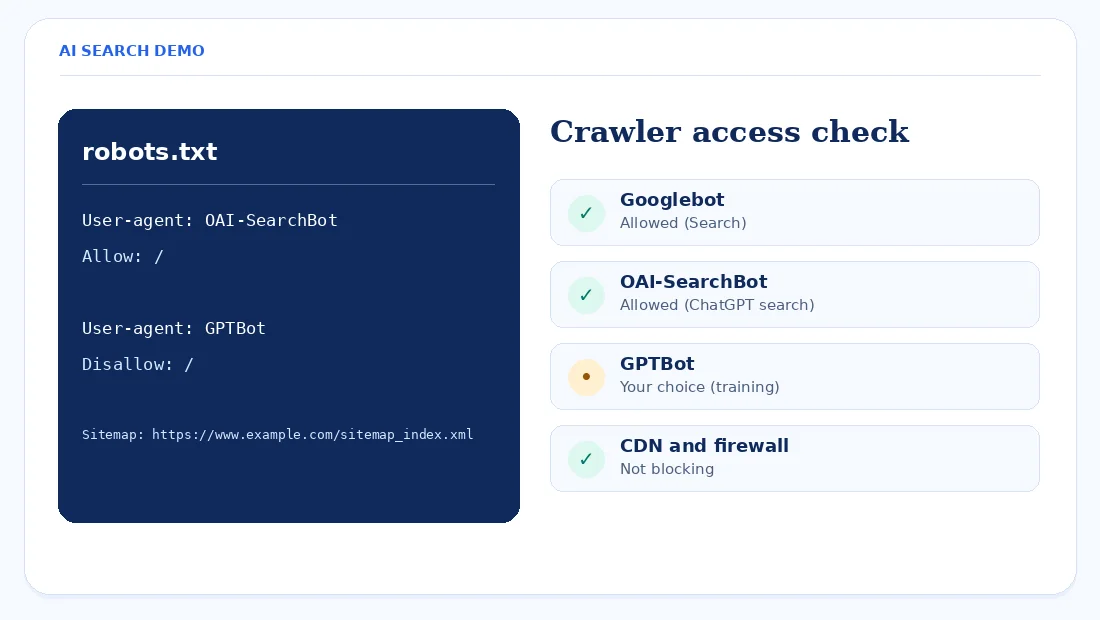
Do this. Open your site’s /robots.txt and ask your site manager to check firewall or CDN logs for blocks affecting Googlebot and OAI-SearchBot.
3. Publish answers only you can give
Google puts particular emphasis on useful, original content that adds something beyond information already available elsewhere. A local business can do this by explaining how it sets a price, what changes the scope, and which jobs it takes. Start with what customers ask before they book. Google Search Central: Optimizing for generative AI
Commodity content
- “We offer quality work at competitive prices.”
- A general list of service benefits.
- Stock photos with no project context.
First-hand content
- Your actual starting price, its scope, and what changes it.
- Your process, service area, and honest trade-offs.
- Your photos and notes from real jobs, with permission.
For a deck page, explain how sloping ground, site access, and the choice of materials change your estimate. Add a photo or project note if you can share one. A reader should leave knowing what information to gather for their own quote.
Do this. List the ten questions customers ask most. Put the clear answer to each question on the page where a customer would look for it.
4. Put the answer in plain text near the top
Put important details in the page text, where someone can read them without opening a PDF, waiting for a slider, or zooming into an image. Use a heading that names the question and answer it in the first sentence or two below. Google says it doesn’t require you to break an article into tiny fragments for AI. Google Search Central: AI features and your website · Google Search Central: Optimizing for generative AI
Link to the page from a relevant menu or service page. For WordPress examples, see our guide to structuring content for AI search.
Do this. Rewrite each core service page’s first paragraph in two sentences covering what you offer, who it’s for, where you work, and how customers can get a price.
5. Keep your business facts consistent
Google recommends keeping your Business Profile information current. Compare your name, phone, hours, address or service area, and core services wherever customers find you. When you publish prices in more than one place, use the same terms or make clear which offer each price belongs to. Google Search Central: AI features and your website
Give customers an About page with real people and a clear way to reach your team. If what you do varies by location, explain it on the relevant service area page.
Do this. Compare your footer, contact page, and Google Business Profile line by line. Correct the first mismatch you find and check the same detail on your main directory listings.
6. Use structured data to describe the page
Structured data labels things such as the business, an article, or a breadcrumb trail. Google doesn’t require special schema for AI features. Where you use markup, make it agree with what the visitor can read. Google Search Central: AI features and your website
In Rank Math or your schema setup, review LocalBusiness or Organization for the business, Service where it fits, and BlogPosting or BreadcrumbList for the relevant pages. The Rich Results Test checks markup for supported Google features. Use a schema validator for types without a supported rich result. A clean validation result gives you a markup check. Google Search Central: AI features and your website
Do this. Run the homepage and top service page through the Rich Results Test and check that any detected details match the page. Fix errors in supported markup.
7. Earn genuine mentions
Google’s guide says its AI features can draw on what people say about products and services around the web. It cautions against seeking inauthentic mentions. Focus on places where a real customer or partner would have a reason to talk about your work. Google Search Central: Optimizing for generative AI
Ask for honest reviews consistently, without incentives or screening for praise. Check whether your trade association has a member directory or a supplier lists installers it works with. If you take part in a community project, share the details with the organizer so they can describe your contribution accurately.
Do this. Ask three recent customers for honest feedback and one active partner whether it can add you to a relevant listing.
8. Measure visibility and visits
Clicks from Google’s AI features are included in the Web search totals in Search Console. Google also provides a dedicated Generative AI performance report for Search where there’s sufficient data. Use its impressions to check which pages surface in those features, and use the Web report for overall clicks. Google Search Central: AI features and your website · Search Console Help: Generative AI performance report
In GA4, open a free-form exploration, add Session source and Landing page as dimensions, and add Sessions as a metric. Filter the source to chatgpt.com to look for attributed visits. To confirm the tag in your own flow, open an example referral link and check whether it contains utm_source=chatgpt.com. This exercise measures visits your analytics recorded.
Track successful inquiries separately using our guide to tracking form submissions in GA4. If a page has visibility and very few visits, review how well it matches the customer question before assuming the page needs a rewrite.
Do this. Save the GA4 exploration filtered to chatgpt.com and review it monthly alongside Search Console impressions and clicks.
Myths to skip
| Myth | What the source says | What to do instead |
|---|---|---|
You need an llms.txt file |
Google says the file doesn’t affect its Search visibility or rankings. Google’s AI optimization guide | Check the pages people actually use. |
| You must split copy into tiny pieces | Google has no such requirement. Google’s AI optimization guide | Use headings and give each answer the space it needs. |
| You need special AI schema | Google requires no special markup for these features. Google’s AI features documentation | Keep the markup you use accurate. |
| Publish hundreds of AI pages for every question | Google says mass production to manipulate AI responses can violate its scaled content abuse policy. Google’s AI optimization guide | Answer questions you can cover from experience. |
| Blocking GPTBot removes you from ChatGPT search | OpenAI treats search and training crawler settings independently. OpenAI crawler documentation | Check the OAI-SearchBot rule separately. |
A 30-day plan for a small business site
Use the month to complete the work and establish a baseline. Inclusion is never guaranteed. Google Search Central: AI features and your website
| Week | Tasks | Who usually does it |
|---|---|---|
| Week 1 | Check indexing, snippets, and crawler access. | Site manager or developer |
| Week 2 | Reconcile business details and validate structured data. | Owner and site manager |
| Week 3 | Rewrite key service pages and answer recurring customer questions. | Owner and writer |
| Week 4 | Request honest reviews, check partner listings, and set up reporting. | Owner and marketer |
Frequently asked questions
Can I pay to appear in Google AI Overviews?
You can’t buy an organic supporting citation. Google says a page needs to be indexed and eligible to show a snippet, and inclusion is never guaranteed. Start with the pages you want customers to find and check whether they meet those conditions. Google Search Central: AI features and your website
Do I need an llms.txt file to be cited by AI?
Google Search doesn’t require an llms.txt file for its AI features and says the file has no effect on its Search visibility or rankings. OpenAI’s crawler documentation explains its robots.txt controls. For the two services covered here, start by checking whether your public pages can be crawled. Google’s AI optimization guide · OpenAI crawler documentation
Will blocking GPTBot stop my site appearing in ChatGPT search?
Blocking GPTBot by itself doesn’t opt your site out of ChatGPT search. GPTBot relates to potential training use and OAI-SearchBot relates to search. OpenAI says those crawler choices are independent, so review both groups and confirm your firewall allows the crawler you want. OpenAI crawler documentation
How do I know if my site appears in AI Overviews?
Check the Generative AI performance report in Search Console when it’s available for your property. It shows impressions in Google’s generative Search features, including AI Overviews and AI Mode. Overall Web clicks include those features. You can also note the query and page if you see your link in a live answer. Search Console Help: Generative AI performance report
Does schema markup help me get cited by AI?
Google’s AI features don’t require special schema. Use structured data to describe what visitors can already see, and check that the details match the page. For Google supporting links, start with indexing and snippet eligibility, then spend time making the page useful for the question. Google Search Central: AI features and your website
How long does it take to start appearing in AI answers?
There’s no fixed timeline for being chosen as a source. OpenAI says its search systems can take about 24 hours to adjust after a robots.txt change. That interval covers the crawler settings. Selection depends on the question and the available sources, and Google doesn’t guarantee inclusion. OpenAI crawler documentation · Google Search Central: AI features and your website
Is optimizing for AI search different from normal SEO?
For Google, the same SEO fundamentals apply because its AI features build on its core Search systems. Make pages accessible, write useful answers, and check the details customers rely on. For ChatGPT search, also review OAI-SearchBot separately from your Google and training crawler settings. Google’s AI optimization guide · OpenAI crawler documentation
Final word
Start with indexing and crawler checks. Once the important pages are accessible, make their answers easier to find and add the details you know from doing the work.
For the next edit, open one service page and read it on a phone. Our WordPress content structure guide goes deeper on headings and page layouts.