
A couple finds your work on Instagram and opens your site on a phone. They love the first photo, but they can’t tell whether you shoot weddings in their city, what coverage costs, or how to ask about their date. They save the photo and close the tab.
A photographer website not getting inquiries often leaves visitors guessing about what you shoot and where, whether the portfolio fits their plans, what it costs, or how to get in touch. These eight fixes follow the order a visitor meets them. We use the same sequence when we review photography and creative websites.
Photographer website not getting inquiries? Find where clients drop off
Start with the last action you can see. Someone who spends time in a gallery and never taps Inquire may need a different fix from someone who opens the form but leaves halfway through. Use this table to decide what to test first.
| What you see | Likely cause | Go to fix |
|---|---|---|
| Instagram visits but quick exits | Unclear first screen or slow images | 1. First screen, 7. Image speed |
| Long portfolio views but few inquiries | Unfocused gallery or no next step | 2. Portfolio |
| “How much?” messages instead of form inquiries | Pricing is hard to find | 3. Pricing |
| Inquiry clicks but few submissions | Long or difficult form | 4. Form |
| Inquiries for the wrong kind of work | Portfolio and About page attract a different client | 2. Portfolio, 5. About page |
| Inquiries that go quiet | Slow or unclear reply | 8. Follow-up |
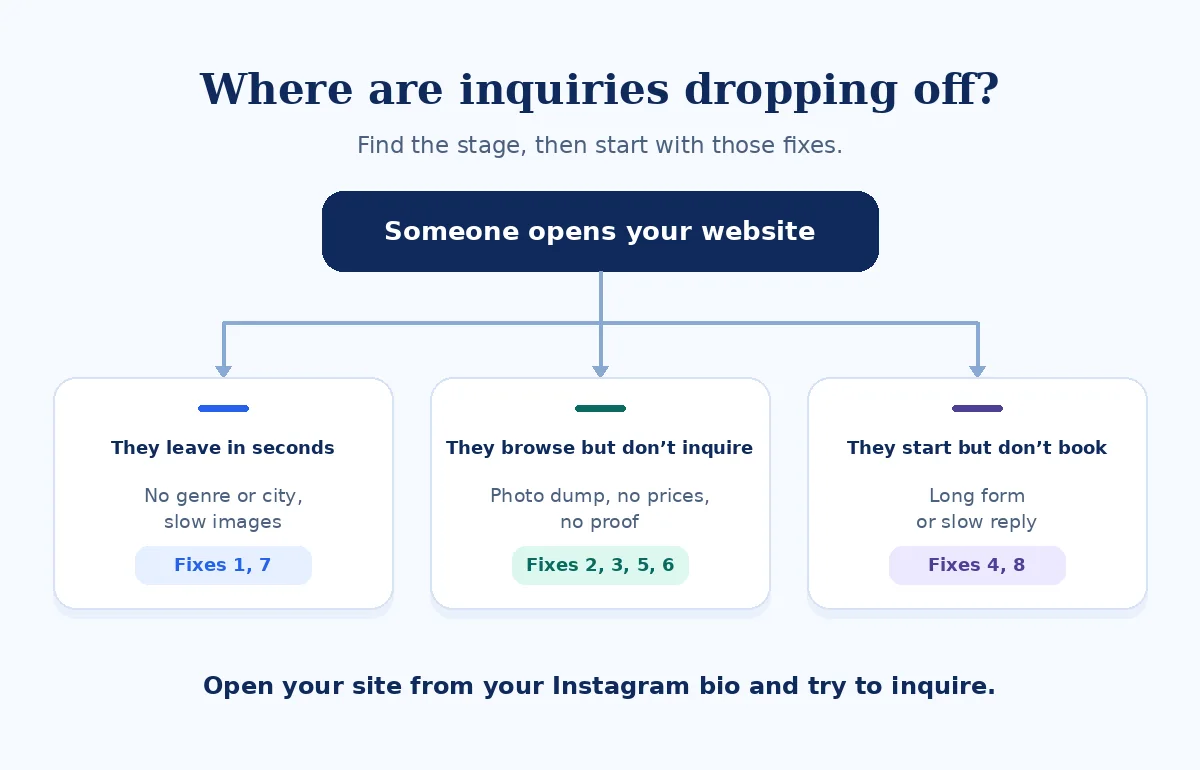
How I check a photography website
I switch off Wi-Fi and open the site from its Instagram bio on a phone. Then I search “[genre] photographer [city]” and try the page a visitor would find there. I time how long it takes for the first image to appear and check whether I can quickly find the genre, the location, and any starting price.
I try to inquire for a plausible date, using a clearly labeled test inquiry agreed with the photographer. I check the confirmation on the site, the email that reaches the test sender, and what lands in the studio inbox. The mockups below use a sample photographer.
1. The first screen doesn’t say what you shoot or where
A full-screen image can show your style while leaving a visitor guessing what you do. Keep one strong photograph and add a line a client can understand at a glance, such as “[Genre] photographer in [City].” Give them one primary button, such as “Check my availability.”
Common problems
- The first screen is a photo and a logo.
- The city is hidden in the footer.
- The only contact link is in the menu.
What to show instead
- One image that matches the work you want.
- Your genre and home base in visible text.
- One prominent inquiry button.
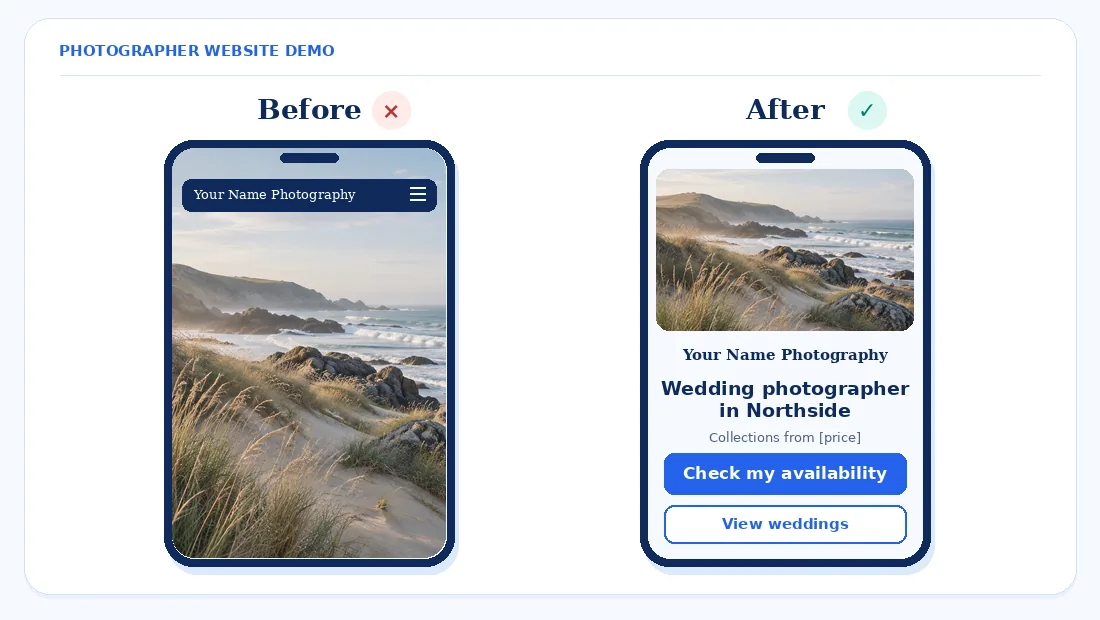
Fix first. Add a genre-and-city headline and one inquiry button to the first mobile screen.
2. Your portfolio is a photo dump
A visitor should be able to picture their own shoot in the work you show. Give related genres separate galleries, such as weddings, family sessions, and portraits. If you shoot commercial work as well, give it a clear entry point so a brand client can find projects relevant to their brief.
Cut repeats and keep the images that show range within the genre. Include a few complete sessions or wedding days so someone can see how you handle changing light, quieter moments, and the parts of a day that don’t look like posed portraits. Keep the sequence easy to browse and use only photos you have permission to publish.
At the end of each gallery, add an inquiry button for that type of work. A visitor who has just finished a full wedding gallery should have a direct way to ask about wedding coverage.
Fix first. Edit your main gallery down to the images that best represent the clients and assignments you want to attract.
3. Pricing is hidden, so people never ask
Someone who doesn’t know whether a session is within reach may leave before asking. Show what you can stand behind, such as a “Sessions start from” line with your confirmed figure, and say what that includes. For weddings, explain the coverage length and what changes the estimate, such as travel or extra hours.
A short package summary or pricing guide helps visitors compare scope and see whether the service fits their budget. For custom commercial work, explain the details you need to estimate it, such as the shoot length, deliverables, and intended image use. Give people a way to ask about their project from the pricing section.
Fix first. Put a “Sessions start from” line beside a relevant inquiry button once you’ve confirmed the figure and scope.
4. Your inquiry form asks too much, too soon
A first inquiry needs enough detail for a useful reply. Ask for name, email, type of shoot, a date or rough timeframe, and location. Add an optional box for plans, and allow “Date not set” or “Venue undecided” when someone can still inquire without those details.
Save the detailed questionnaire for after the first reply. On the form and confirmation screen, explain what you’ll do next and when the client can expect to hear from you. Test delivery from a phone and check the studio inbox. If the notification is missing, see our WordPress contact form email guide.
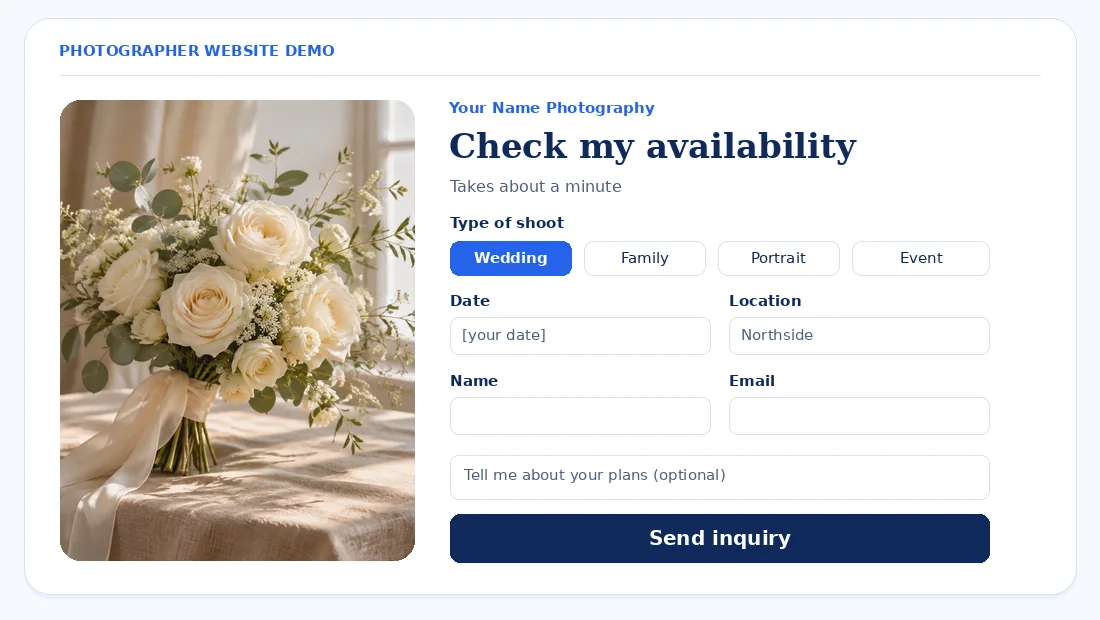
Fix first. Cut the form to five or six fields and submit a test on your phone.
5. Your About page leaves clients guessing what a shoot feels like
Open with who you work with and what it’s like to be photographed by you. A couple may want to know how much direction you give. A family might want to know what happens if a child needs a break. Explain how you handle situations that come up in your own work.
Use a clear photo of yourself, describe what clients receive and when, and write the way you speak on a consultation. If your role includes planning a shoot or helping clients choose a location, explain where that fits. End with a link to inquire so readers who are comfortable with your approach can ask about a date.
Fix first. Rewrite the opening paragraph around what a client can expect before, during, and after a session.
6. There’s no proof from real clients
Put client words near the work they describe, with permission. A short comment about how you helped someone feel comfortable during a portrait session gives a new client something specific to picture. Link to your Google reviews if you have them, and show features or vendor recommendations only where they’re genuine.
Add a short “What to expect” timeline, from the first conversation through image delivery. Invite honest feedback consistently. Keep self-written and purchased reviews off the site, and avoid incentives or asking only satisfied clients to post publicly.
Fix first. Ask your last five clients for honest feedback and permission to share relevant excerpts next to the matching galleries.
7. Huge images slow the site, and Google can’t read CSS backgrounds
Keep full-resolution files for delivery and export smaller web copies for your homepage and galleries. Use responsive images with srcset or <picture> and a standard <img src> fallback. Lazy-load gallery images below the first screen and let the lead image load promptly. Set width and height so the page can reserve space.
Google can discover images through the src of an HTML image element and doesn’t index CSS background images. Use HTML images for work you want discovered. Use short descriptive filenames and alt text that explains the image in context. Google Search supports WebP and AVIF. Google Search Central: Image SEO best practices
Google’s good Core Web Vitals thresholds are LCP of 2.5 seconds or less for main content loading, INP of 200 milliseconds or less for responsiveness, and CLS of 0.1 or less for layout stability. Test the homepage and a gallery in the Mobile view of PageSpeed Insights. Google Search Central: Core Web Vitals · PageSpeed Insights
For Elementor sites, see our guides to fixing Core Web Vitals and common mobile layout problems.
Fix first. Re-export the homepage and top gallery images as WebP at the sizes you actually serve.
8. Inquiries go unanswered, or land in spam
A client may be checking the same date with more than one photographer. Send an automatic acknowledgment that confirms you received the message and gives a reply window you can meet. In your first personal reply, say whether the date is available, answer their main question, and give one next step.
Check spam and form records for missed notifications, especially after changing hosts or mail settings. Count inquiry button clicks separately from successful submissions, then compare submissions with the messages you answered. See our guide to tracking WordPress form submissions in GA4.
Fix first. Set up an auto-reply that gives a specific reply window and check that it reaches a test sender.
What to fix first
Effort and impact are our estimates. Start wherever the test points to a clear block. If messages are failing to reach you, repair delivery before redesigning your galleries.
| Fix | Effort | Who usually does it | Impact on inquiries |
|---|---|---|---|
| 1. First screen | Low | Photographer and site editor | High |
| 4. Form | Medium | Site editor or developer | High |
| 3. Pricing | Low | Photographer | High |
| 7. Image speed | Medium | Photographer and developer | High |
| 8. Follow-up | Low | Photographer or studio manager | High |
| 2. Portfolio | Medium | Photographer | Medium |
| 5. About page | Low | Photographer or copywriter | Medium |
| 6. Client proof | Medium | Photographer or studio manager | Medium |
Frequently asked questions
Why is my photography website getting views but no inquiries?
Start by checking whether a visitor can find your genre, location, price guidance, and inquiry button on a phone. If those are easy to find, try submitting the form yourself. Compare what visitors see on gallery pages with what they need to know before asking about a date.
Should photographers show prices on their website?
Show a starting price or a package range if you can explain what it covers. For work that needs a custom quote, name the factors that change the estimate and tell clients when they can expect a figure. Put that information where they decide whether to inquire.
What should a photography inquiry form ask?
Ask for name, email, type of shoot, date or rough timeframe, and location. Give clients an optional box for extra plans or questions. If someone is still choosing a venue or date, let them say so. Explain when you’ll reply immediately after they submit.
How many photos should be in a photography portfolio?
Use enough images to show the kind of work a client can expect, and remove near-duplicates. A short highlight gallery can show your style, while a few complete sessions show how you work across different moments and conditions. Add images only when they show something the existing selection leaves out.
Should I have separate websites for different types of photography?
Separate galleries or pages usually work for related kinds of photography, such as family and newborn sessions. A separate website can make sense for very different audiences, such as wedding couples and commercial buyers. Consider whether the two audiences need different services, pricing, examples, and inquiry paths.
How do I make my photography website load faster?
Resize images to their display needs, export web copies as WebP, and lazy-load photos that appear farther down the page. Check how quickly the main image appears on a phone. Google’s good LCP target is 2.5 seconds or less, so test the homepage and individual galleries. Google Search Central: Core Web Vitals
How quickly should I reply to a photography inquiry?
Acknowledge it as soon as it arrives and give a reply window you can reliably meet. When you respond personally, confirm whether the date is available, answer the question they asked, and say what happens next. Check spam and form notifications if people say they never got a response.
Final word
Give visitors enough information to decide whether your work, location, and price fit their plans. Start with what they see on the first screen, what they need to fill in, and whether pricing is easy to find.
Related reading. See what to check when a coach website gets visits but no discovery calls.