Someone compares three gyms near work on their phone. Yours has a class that fits their lunch break, but the timetable is a PDF and the free trial page asks for a card without explaining when they’ll be charged. They close the tab with the same questions they had when they opened it.
Gym website not getting sign ups? Start by checking whether the trial is clear on the first screen, the form is easy to finish, and the price and terms are visible before booking. These eight fixes follow the path from finding your gym to showing up for a first visit. It’s the same path we look at when we build websites for gyms and fitness studios.
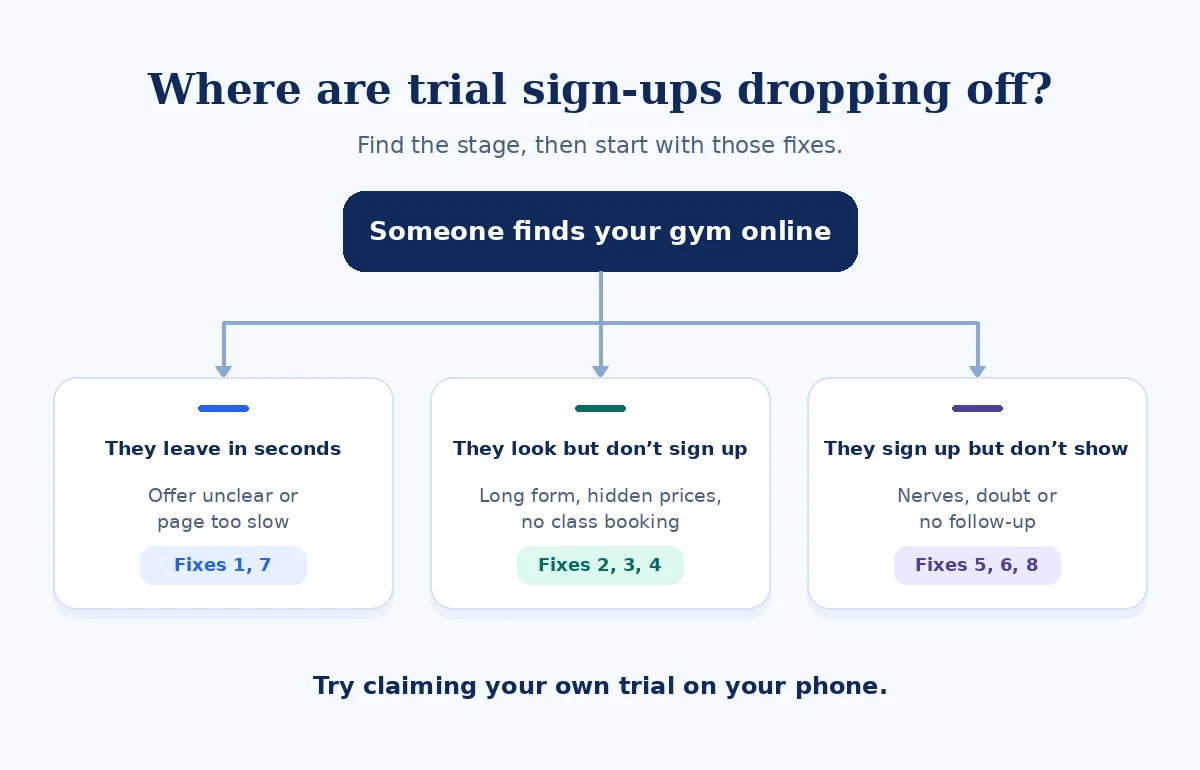
Gym website not getting sign ups? Where would-be members drop off
Start with the last step you know people reach. If the timetable gets views but nobody books, open it on your phone and see whether someone can reserve a class from there. Use the table to pick a test, then check the result before changing the page.
| What you see | Likely cause | Go to fix |
|---|---|---|
| Visits but few trial clicks | The offer is unclear | 1. First screen |
| Trial clicks but few completed forms | Long form or off-site handoff | 2. Trial form |
| Messages asking “How much?” | Prices or terms are hard to find | 3. Price and terms |
| Timetable views but few bookings | No live class booking | 4. Timetable |
| Beginners rarely book | First-visit details are missing | 5. Beginner information |
| Mobile visitors leave quickly | The page may be slow or awkward | 7. Mobile performance |
| People book but don’t show up | Confirmation or follow-up gaps | 8. Follow-up |
How I check a gym website
I turn off Wi-Fi and search “gym near [suburb]” and “[class type] [suburb]” on mobile data. I open the page someone would actually land on and time the path to a first class. I note what I still can’t answer about price, what’s included, and what happens at the end of the trial.
Then I make an agreed test booking and check what arrives in the visitor’s inbox and at the front desk. I look for a clear appointment time, a way to reschedule, and who follows up. The mockups below use a sample gym and illustrative class times.
1. The first screen doesn’t say what the trial is
Someone who lands on a class page or the homepage should know what they can try and where. Use the words your team would say at reception. A free first class, a seven-day pass, and a paid intro week are different offers, so give each its real name and state who qualifies.
Common problems
- A slogan fills the screen while the offer sits in the menu.
- The class and suburb are missing.
- Several buttons lead to different sign-up paths.
What to show instead
- Your exact offer in plain words.
- Who it’s for and which location takes trial bookings.
- One primary button that names the next step.
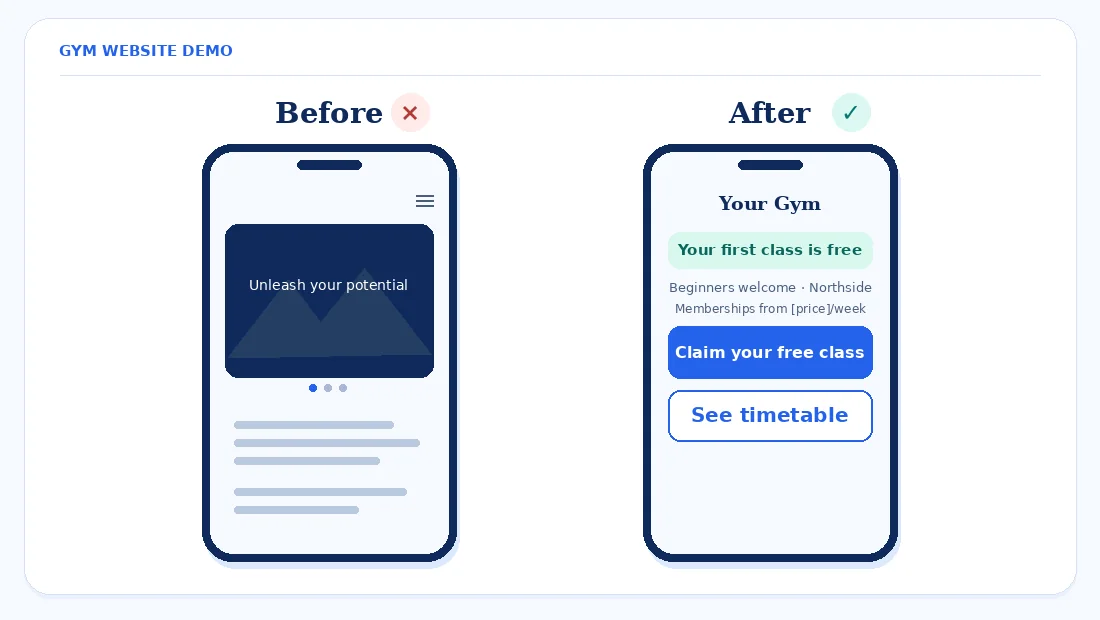
Fix first. Replace the slogan with your exact offer and one main button, such as “Claim your free class” if the class is free.
2. The trial form asks for too much, or sends people off-site
A long form turns a simple booking into homework. Look for fields nobody needs to reserve a place, along with forced account creation, CAPTCHA failures, or a booking widget that opens an unfamiliar app. If the scheduler needs to open on another site, make your gym name, location, and trial offer visible there too.
Keep the form to a name, one contact method, and a preferred time or class. Ask about goals later. On submission, say whether the slot is reserved or someone will contact them to confirm. Test both the sign-up message and reception’s notification. If there’s no email, check why your WordPress contact form isn’t sending emails.
Fix first. Cut the form to three or four fields and complete a real test on your phone.
3. Prices and trial terms are hidden or unclear
Show what the trial covers, whether a card is needed, and what happens when it ends. Give a starting membership price or a range, with the billing interval and any applicable joining fees or minimum commitment. If the trial can convert to paid membership, explain when the first payment is due and how to cancel before someone submits.
- US. The Eighth Circuit vacated the FTC’s 2024 Click-to-Cancel rule on July 8, 2025. More than half of states have automatic-renewal laws, according to the cited legal summary. Check your state’s rules and applicable federal requirements with an adviser. WilmerHale: Eighth Circuit vacates the FTC’s Click-to-Cancel Rule · Greenberg Traurig: Eighth Circuit vacates FTC’s Click-to-Cancel Rule
- UK. The new DMCC Act subscription rules are scheduled for January 2027. They include reminders before certain renewals, including when a trial ends, and a 14-day renewal cooling-off period after a trial converts or a qualifying long-term contract auto-renews. Check the final guidance and how it applies to your offer. GOV.UK: Government response on the new subscription contracts regime · Fieldfisher: Subscription reforms
- Australia. Make prices and ongoing subscription terms clear before sign-up. Check the current guidance and ask an adviser about your offer if needed. ACCC: Price displays
Fix first. Put a short “What happens after your trial?” box next to the sign-up button with the actual price, billing date and cancellation process where applicable.
4. Your timetable is a picture, and nobody can book a class
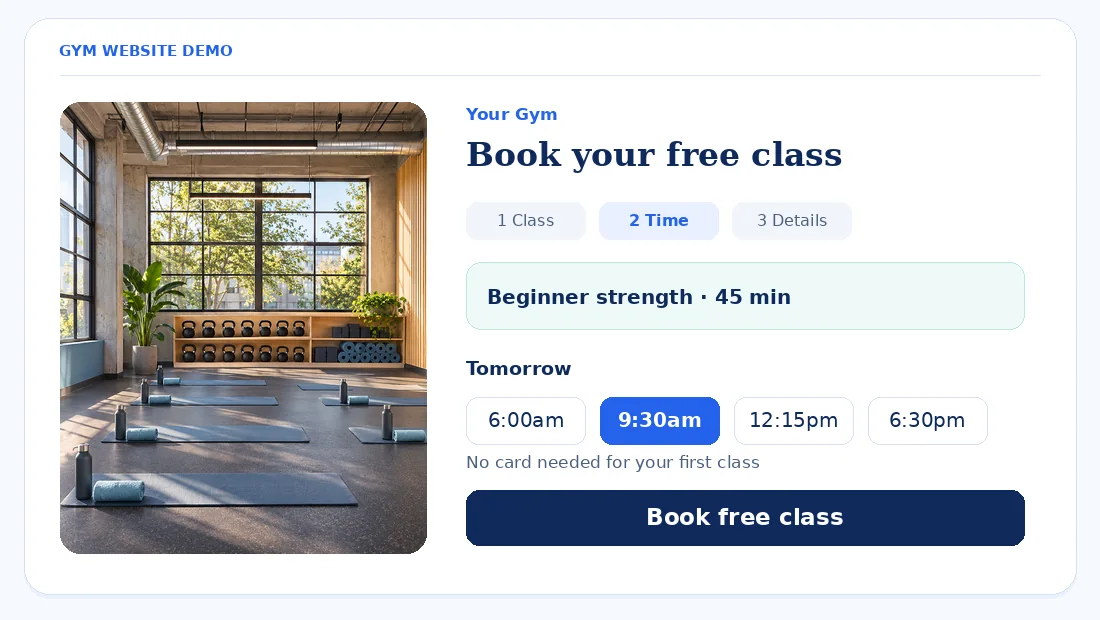
A timetable image can show when classes usually run, but someone looking at it can’t tell whether tomorrow’s beginner session has room. Publish a live schedule that fits a phone screen. Show the class name, start time, location, and whether someone can use their trial for it.
Give every eligible class a “Book your free class” button if the offer is free. Send it straight to the right session in your booking system. For a full class, show another available time or a waitlist if you operate one. Check that schedule changes and canceled classes stay in sync with what reception sees.
Eligible fitness businesses can offer booking through their Google listing via supported Reserve with Google scheduling partners. Where the Booking option is available, you can also add your own appointment link in Google Business Profile and choose a preferred link. Open the link on your phone and confirm it lands on the right location and lets a newcomer book. Google: An easy booking button for businesses on Google · Google Business Profile Help
Compare tools with our guide to choosing a WordPress booking system or see our booking system setup.
Fix first. Replace the timetable image with a live schedule people can book from, starting with your trial-eligible classes.
5. Beginners can’t tell if your gym is for them
A newcomer may want to know whether they’ll be expected to know the movements or keep up with regulars. Walk them through the visit from the front door to the end of the class. Say who greets them, whether to come ten minutes early if that’s your process, what to bring, and how the coach adapts a session where appropriate.
Point to classes that genuinely suit beginners. Include practical information about parking, step-free access, and where to leave belongings. Mention quieter sessions, women-only hours, or childcare only if you offer them. A real photo of the entrance or class floor can help someone recognize the place when they arrive.
Fix first. Add a short “What happens on your first visit?” section and link to it beside the trial button.
6. Your photos and proof don’t feel real
Use photos of the space a visitor will walk into and the coaches they may meet. A class photo can show how many people work together and where equipment is set up. Ask permission before publishing identifiable photos, and make coach bios specific about the classes they teach and the qualifications they actually hold.
Link to genuine Google reviews. With permission, share member stories in the member’s own words, such as what helped them feel comfortable attending a first session. Ask for honest reviews without screening out unhappy members or offering rewards. Give people a sense of what the gym is like without making fitness results sound guaranteed.
Fix first. Swap the stock hero photo for an approved photo of a real class in your space.
7. The site is slow or awkward on a phone
An autoplay video, slider, Instagram feed, chat widget, or booking embed can delay the first screen. Test your homepage, timetable and free trial page on mobile data. Check whether the call-to-action stays visible when the timetable loads or the chat button appears.
Google’s good Core Web Vitals thresholds are LCP of 2.5 seconds or less for the main content to load, INP of 200 milliseconds or less for responsiveness, and CLS of 0.1 or less for layout stability. Use the Mobile view in PageSpeed Insights, then test the real tap and booking flow yourself. Google Search Central: Core Web Vitals · PageSpeed Insights
Our guides cover Core Web Vitals on Elementor and mobile layout issues in Elementor.
Fix first. Replace the autoplay hero with one compressed image and remove any heavy Instagram feed from the homepage. Test the trial button again.
8. Trial leads go cold before they visit
Send a confirmation as soon as a place is booked. Include the class, date, time, address, parking, what to bring, and how to move the booking. Send a reminder the day before. If your team can manage it, a short personal message from the coach can answer questions before the visit. Afterward, thank the visitor and offer a clear next step without assuming they want a membership.
Count trial button clicks, completed trial forms or bookings, and trials attended as separate actions. Check the scheduler against front-desk attendance so you can see whether people abandon the form or reserve a place and miss it. Follow the consent and anti-spam rules that apply if you text members. See our guide to tracking WordPress form submissions.
Fix first. Set up an automatic confirmation and a reminder the day before, then place a test booking and read both messages.
What to fix first
This is the order we’d normally work through. Effort and impact are our estimates. Move a broken form or booking link to the top if it prevents people from reserving a place.
| Fix | Effort | Who usually does it | Impact on sign-ups |
|---|---|---|---|
| 1. First screen | Low | Gym manager and site editor | High |
| 2. Trial form | Medium | Site editor or developer | High |
| 3. Price and terms | Low | Gym owner or manager | High |
| 8. Follow-up | Medium | Front desk and booking provider | Medium |
| 4. Timetable | High | Developer and booking provider | High |
| 7. Mobile speed | Medium | Developer | Medium |
| 5. Beginner information | Low | Coach and site editor | Medium |
| 6. Photos and reviews | Medium | Gym manager and site editor | Medium |
Frequently asked questions
Why is my gym website getting traffic but no sign-ups?
Start with the trial offer, form, and pricing. A visitor should be able to see what’s included, check what membership costs, pick an eligible class, and tell whether they have a confirmed place. Try the process on a phone and compare trial button clicks with completed bookings to find where it breaks.
Should a gym show membership prices on its website?
Yes, show enough pricing for someone to decide whether your gym fits their budget. Give the actual billing interval and any joining fees or minimum commitment. If prices vary by plan, explain what each plan covers and when the visitor can see the full terms before they sign up.
Should a free gym trial require a credit card?
Ask for a card only if your trial genuinely needs one. Trial and auto-renewal rules differ by country and US state. Explain when payment starts, what you’ll charge, and how to cancel. Use clear terms and timely reminders, and have an adviser check your setup. Greenberg Traurig: US state rules · GOV.UK: Subscription contracts regime
What should a gym free trial sign-up form ask for?
Ask for a name, a phone number or email address, and the preferred class or time. Collect any other details only when you need them and through the right process. After submission, tell the visitor whether they have booked a place or should wait for your team to confirm.
How do I let people book a class from Google?
Check whether your scheduling provider supports Reserve with Google for your business and location. If your Google Business Profile offers a Booking option, you can also link directly to your class booking page. Test the public link on your phone and check it opens an eligible session at the right location. Google: Booking for businesses · Google Business Profile Help
How fast should a gym website load on mobile?
Aim for the main content to load within 2.5 seconds, Google’s good LCP threshold. Test the trial page and timetable as well as the homepage. On mobile data, watch for a slow calendar, buttons that shift under your thumb, and widgets that get in the way. Google Search Central: Core Web Vitals
How do I stop trial sign-ups from not showing up?
Send a confirmation and a reminder with the class time, address, and details people need to arrive prepared. Give them an easy way to reschedule. Ask your team to record attendance and look for patterns, such as first-timers booking the wrong location or getting no reminder for an early class.
Final word
Make the offer obvious, show what it costs and what happens afterward, and let someone reserve a class with a few taps. Start with the first screen, the trial form, and the terms next to the button.
Related reading: Coach website getting visitors but no discovery calls · Clinic website not getting appointment requests