A homeowner sits down after dinner to compare builders for a new deck. They open three websites, look for a project like theirs, and try to work out who covers their neighborhood. By the time they find someone with clear photos and a simple quote form, the other tabs are easy to close.
Contractor website not getting leads? Start with three things: show what you build and where, make the quote form easy to finish, and show proof of real projects. These nine fixes follow the questions homeowners ask as they decide whom to contact. We use those same questions when we build construction and architecture websites.
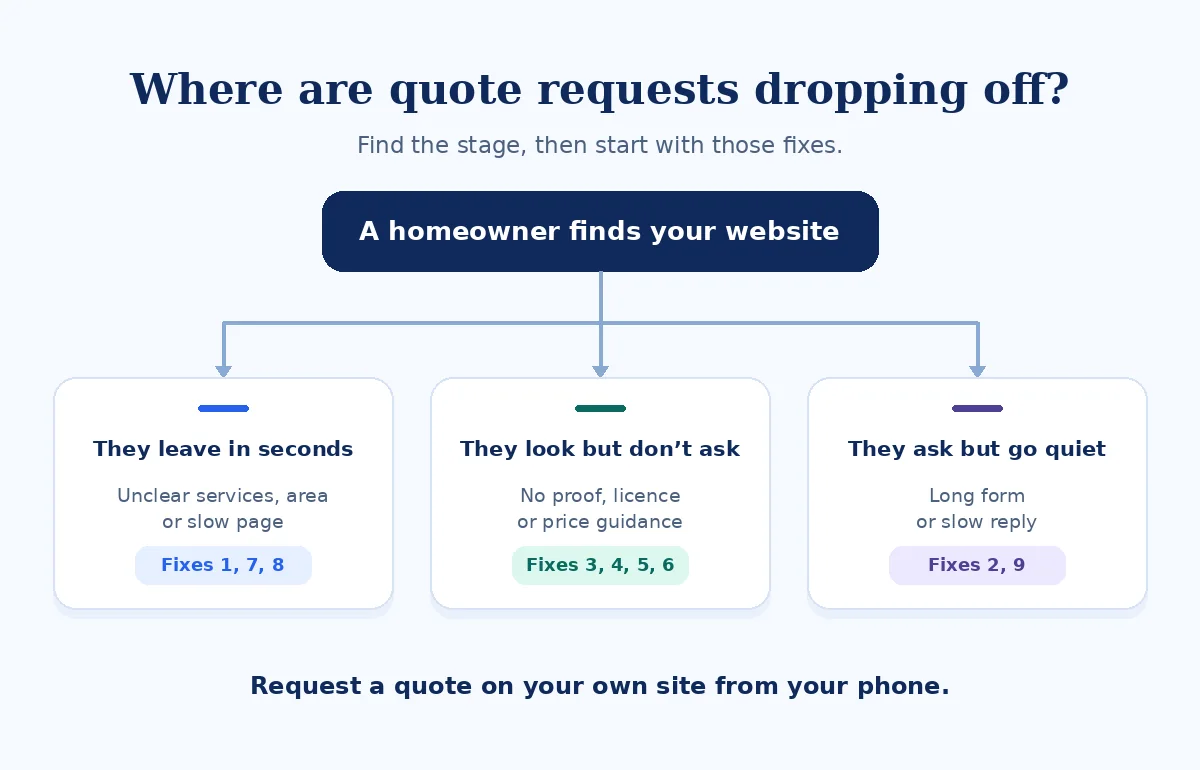
Contractor website not getting leads? Find where homeowners drop off
Start with the last action you can confirm, such as a gallery view or a quote button tap. Ask whoever answers email what homeowners still need to clarify. Then use the table to pick one part of the site to test before rewriting everything.
| What you see | Likely cause | Go to fix |
|---|---|---|
| Visits but few quote clicks | Unclear first screen | 1. First screen |
| Quote clicks but few completed forms | Long or broken form | 2. Quote form |
| People view the gallery but rarely get in touch | Photos lack project details | 3. Project photos |
| People email to ask if you’re licensed or insured | Credentials are hard to find | 4. Credentials |
| Inquiries for jobs you don’t take | Pricing or job fit is unclear | 6. Fit and pricing |
| Inquiries from outside your area | Service areas aren’t visible | 7. Service area |
| Good inquiries go quiet | Replies arrive too slowly | 9. Follow-up |
How I check a contractor website
I turn off Wi-Fi, search for “[service] [suburb]” on mobile data, and open the page a homeowner would find. I time a quote request for a realistic job, such as replacing a weathered deck. I note whether I can tell what the contractor builds, where they work, whether they’re licensed and insured, what the job might cost, and when they might start.
With the business’s permission, I submit a clearly labeled test inquiry. I check what confirmation appears, what reaches the inbox, and how long the follow-up takes. The mockups below use a sample contractor to show what I look for.
1. The first screen doesn’t say what you build or where
“Quality you can trust” could describe any contractor. A homeowner landing on your site needs to see the work you do, the area you cover, and how to get a quote. Put a real project photo near those details and keep a tap-to-call option nearby for visitors with questions.
Common problems
- A slogan takes up the first screen.
- The service area is tucked into the footer.
- The only quote link is hidden in the menu.
What to show instead
- The service and location, such as “Decks and extensions in [suburb].”
- A photo of one relevant project you completed.
- One prominent quote button and a secondary Call option.
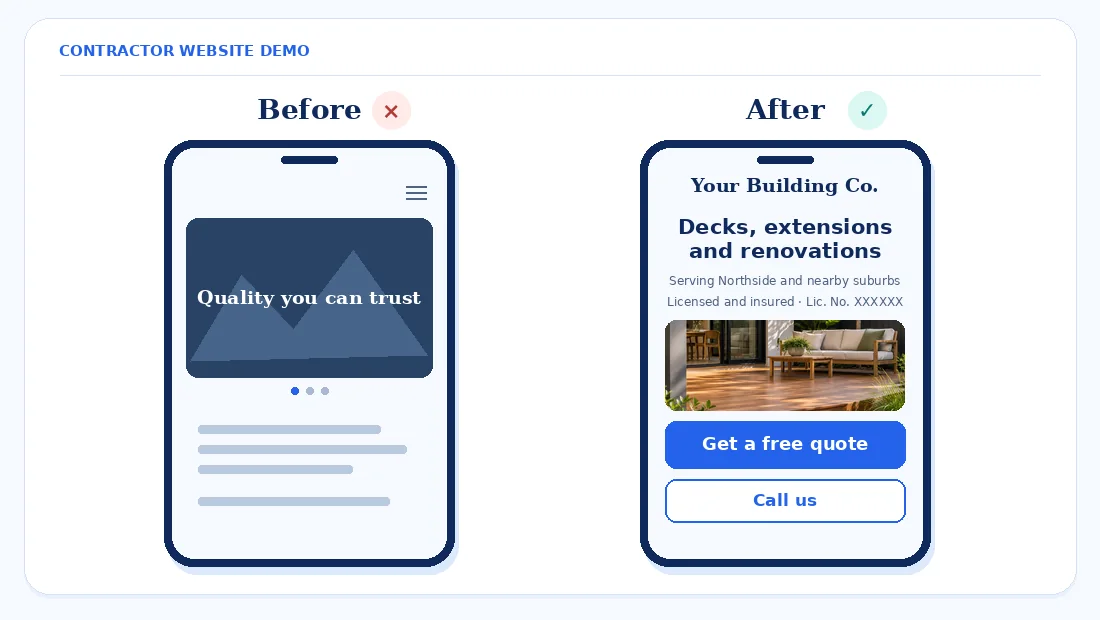
Fix first. Replace the slogan on mobile with what you build and where. Put one “Get a free quote” button on the first screen if the quote is free.
2. The quote form is too long, too vague or broken
A contractor quote request form can be short and still give you enough information to call back. Avoid a wall of fields, a blank “Tell us everything” box, or questions about details a homeowner may not know yet, such as exact dimensions. Make it easy to move back a step without losing the answers already entered.
Start with project type and suburb or postcode. Then ask for a budget range and preferred timeline, with an “Unsure” option where it makes sense. Offer an optional photo upload and put name, phone, and email at the end. Explain what will happen after they submit.
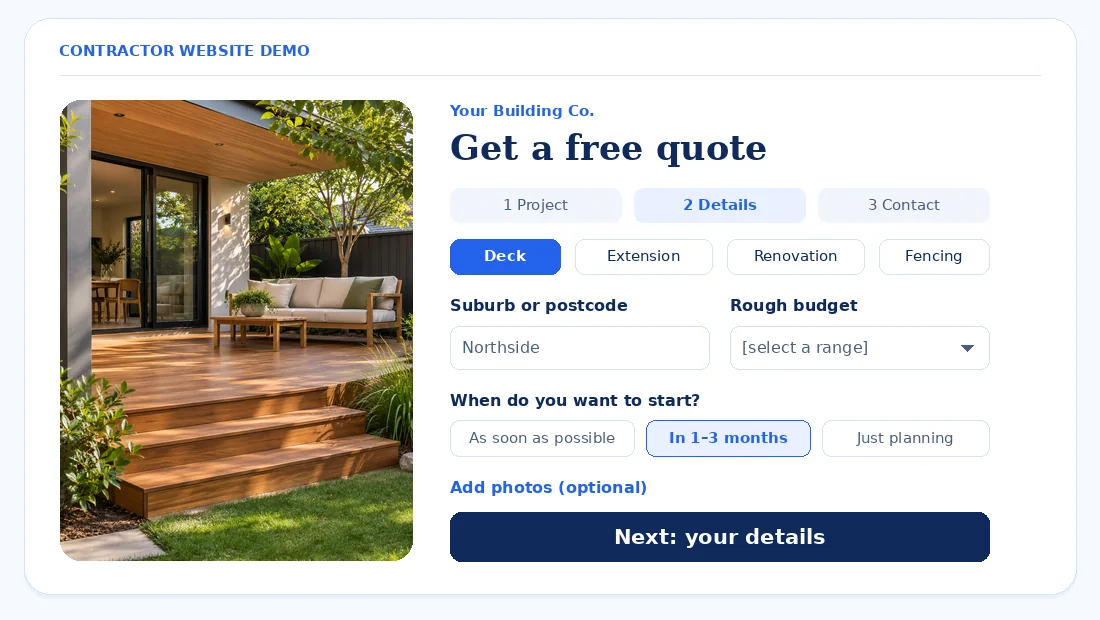
Test it with and without a photo on a phone. Check that the confirmation appears, the email arrives, and someone can read the answers in the inbox. If it fails, see our guide to a WordPress contact form that isn’t sending emails.
Fix first. Split the form into short steps and move contact details to the end.
3. There are no real project photos, or no story behind them
A gallery can show that a job looks good and still leave the reader wondering what you did. Put the suburb, scope, key materials, and verified timeframe next to each set of photos. Explain one decision that shaped the result, such as retaining access to the yard during a deck build.
Use your own project photos and compress them to WebP. Pair a before and after photo taken from a similar angle when you have both. Share a client’s words or photos of their property with permission, and leave out identifying details the homeowner wants kept private.
Fix first. Add a two-line caption with the suburb, scope, and actual timeframe to your six strongest projects.
4. Your license, insurance and warranty details are missing
Homeowners may want to verify who will do the work before sharing their contact details. Show the credentials your business holds, current insurance information appropriate for the site, and a summary of warranties you actually offer. Link to the relevant public license register where available so people can check it themselves.
- California. The CSLB says licensed contractors must include their license number in construction advertising, including websites or online posts that solicit business. CSLB Advertising Guidelines
- Queensland. The QBCC requires the licensee’s name and QBCC licence number in advertisements, including websites. For a company, show the company’s name and licence number. A trading name alone may not satisfy the requirement. QBCC: Advertising
- Elsewhere. Check your local licensing body’s advertising rules and how they apply to your business and trade.
If you list a trade membership, check that it’s current. Say where a homeowner can see written warranty terms and who to contact with a question about coverage.
Fix first. Put the correct license details in your footer and on the quote page, and check whether your regulator requires them anywhere else.
5. One “Services” page is doing all the work
A homeowner who searches for “[service] [suburb]” wants to see the service they asked about. A single page that lists kitchens, bathrooms, decks, extensions, and fencing gives each job only a line or two. It’s harder for a visitor to tell whether you handle the kind of project they have in mind.
Give each main service a page with relevant projects, the steps from inquiry to quote, typical timeframes when you can confirm them, and answers to questions you hear often. Link to those pages from your services menu and relevant galleries. Put a quote button at the top and bottom of each page.
Fix first. Split your three main services into their own pages and link each page to the quote form.
6. Visitors can’t tell if you’re the right fit or roughly what it costs
Tell people which jobs you take and what information you need before you can quote. If you only take full renovations, make that clear so someone looking for a small repair can decide early. Give a realistic lead time or tell visitors when you can confirm scheduling.
Explain whether you start with a call, need a site visit, or issue a written quote after reviewing photos and plans. If you can stand behind a starting price, say “Projects usually start from” followed by your figure, and explain what that scope includes. If the cost depends on site access or material choices, explain when those details enter the quote.
Fix first. Add a short “How our quotes work” section to each core service page.
7. Your service area is unclear
Put an “Areas we work in” list on the homepage and quote page. If coverage changes by job type, say so. A fencing customer shouldn’t have to guess whether a suburb listed on your renovation page applies to their job too.
Build a separate area page when you have projects or practical local details to share. A coverage list is enough for neighboring suburbs where a dedicated page would repeat the same copy. See our guides to service area pages and location pages without duplicate content.
Fix first. Add a written service area list beside the quote button and check it against the jobs you’re willing to take.
8. Heavy galleries make the site slow on a phone
Full-size project photos, sliders, and background videos can delay the first screen. Test the homepage, a project page, and the quote form on mobile. Resize photos to match where you display them, export them as WebP, and lazy-load images farther down the page. Replace a rotating slider with one strong photo that loads promptly.
Google’s good Core Web Vitals thresholds are LCP of 2.5 seconds or less for main content loading, INP of 200 milliseconds or less for responsiveness, and CLS of 0.1 or less for layout stability. Use the Mobile view in PageSpeed Insights, then open the gallery over mobile data and tap the quote button. Google Search Central: Core Web Vitals · PageSpeed Insights
For Elementor builds, see our guides to fixing Core Web Vitals and fixing mobile layout issues.
Fix first. Compress the gallery photos and show just the first row on the homepage. Give visitors a link to browse the full gallery.
9. Quote requests get lost or answered too slowly
A homeowner may be speaking with more than one contractor. Send an automatic acknowledgment with what happens next and a reply window you can keep. Give one person ownership of new inquiries and make sure someone covers the inbox when they’re out on a job.
Submit a test and check spam, routing, and any saved submissions before relying on email alone. Count quote button taps separately from successful form submissions, then compare submissions with replies. A tap tells you someone showed interest. The form and inbox checks tell you whether the request reached your team. WordPress form tracking in GA4
Fix first. Set up an automatic reply that says exactly when you’ll be in touch, then check that it reaches a test sender.
What to fix first
This is the order we’d normally use. Effort and impact are our estimates, and a broken form or missing notifications should move straight to the top when you find them.
| Fix | Effort | Who usually does it | Impact on quote requests |
|---|---|---|---|
| 1. First screen | Low | Site editor | High |
| 2. Quote form | Medium | Site editor or developer | High |
| 9. Follow-up | Low | Office manager | High |
| 4. Credentials | Low | Business owner and site editor | High |
| 3. Project photos | Medium | Project lead and site editor | High |
| 6. Fit and pricing | Low | Estimator and site editor | Medium |
| 5. Service pages | Medium | Site editor and project lead | Medium |
| 7. Service area | Low | Site editor | Medium |
| 8. Mobile speed | Medium | Developer | Medium |
Frequently asked questions
Why is my contractor website getting traffic but no quote requests?
Start by checking whether homeowners can tell what you build and finish your quote form on a phone. Try the process from a service or project page as well as the homepage. If the form works, check whether your photos show relevant jobs and whether someone can verify your credentials.
What should a contractor quote request form ask for?
Ask for the project type, suburb or postcode, approximate budget, preferred timeline, and contact details. Let homeowners attach photos if they have them. Include an option for people who haven’t set a budget yet, and explain when your team will reply after they submit.
Should contractors show prices on their website?
Show a starting price or range when you can explain what it covers. If every job needs a site visit or detailed plans, say when you can give an estimate and what factors change it. Clear job types and a minimum scope can also help homeowners decide whether to ask for a quote.
Do I need to show my licence number on my website?
Check your licensing body because rules differ by state and country. California’s CSLB requires licensed contractors to show their license number in website advertising. Queensland’s QBCC requires the licensee’s name and licence number in advertising, including websites. Confirm the exact display requirements for your business. CSLB Advertising Guidelines · QBCC: Advertising
How many project photos should a contractor website have?
Start with enough photos to show the work you want to win. One clear finished photo and a useful detail or before photo can tell the story of a single job. Cover your main services and explain what you did in each project, where it was, and which constraints mattered.
How fast should I reply to a quote request?
Acknowledge it as soon as it arrives and give the earliest reply window your team can reliably meet. Tell homeowners when a person will call or email and what information would help prepare the quote. If you miss the stated window often, adjust it and assign an owner for new inquiries.
Do I need a separate page for each service?
Give each main service its own page when it answers different questions and you can show relevant work. Start with the jobs you most want to win. Group closely related work when it shares a process and gallery, then make sure each page gives visitors a direct way to request a quote.
Final word
Homeowners can make a decision when they can see what you build, where you work, and how to verify your credentials. Test the first screen, the form, and the reply process before adding more pages.
Related reading. See our roundup of plumber website examples and our guide to clinic websites with few appointment requests.